 Three-handed hyper-turbo · Spin & Go · Twister
Tracker, HUD and advanced analysis for three-handed hyper-turbo, with cash and MTT support built in. 70+ HUD layouts, and new HUDs and pop-ups keep arriving. Fast — the overlay refreshes in under a second after a hand and never stutters, however many tables you run. Your database stays on your computer.
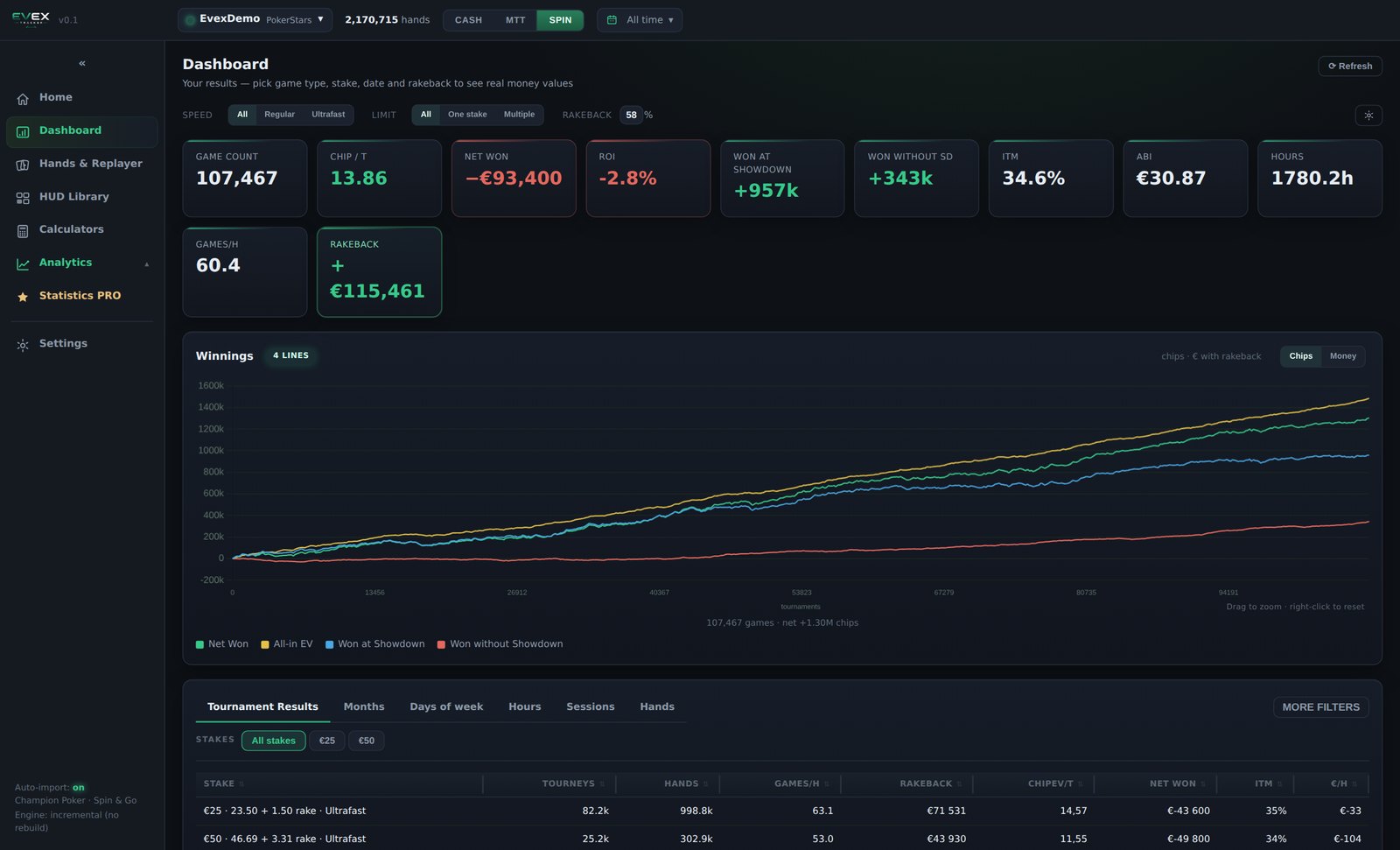
Screenshots from a demo database. Opponent names have been replaced.
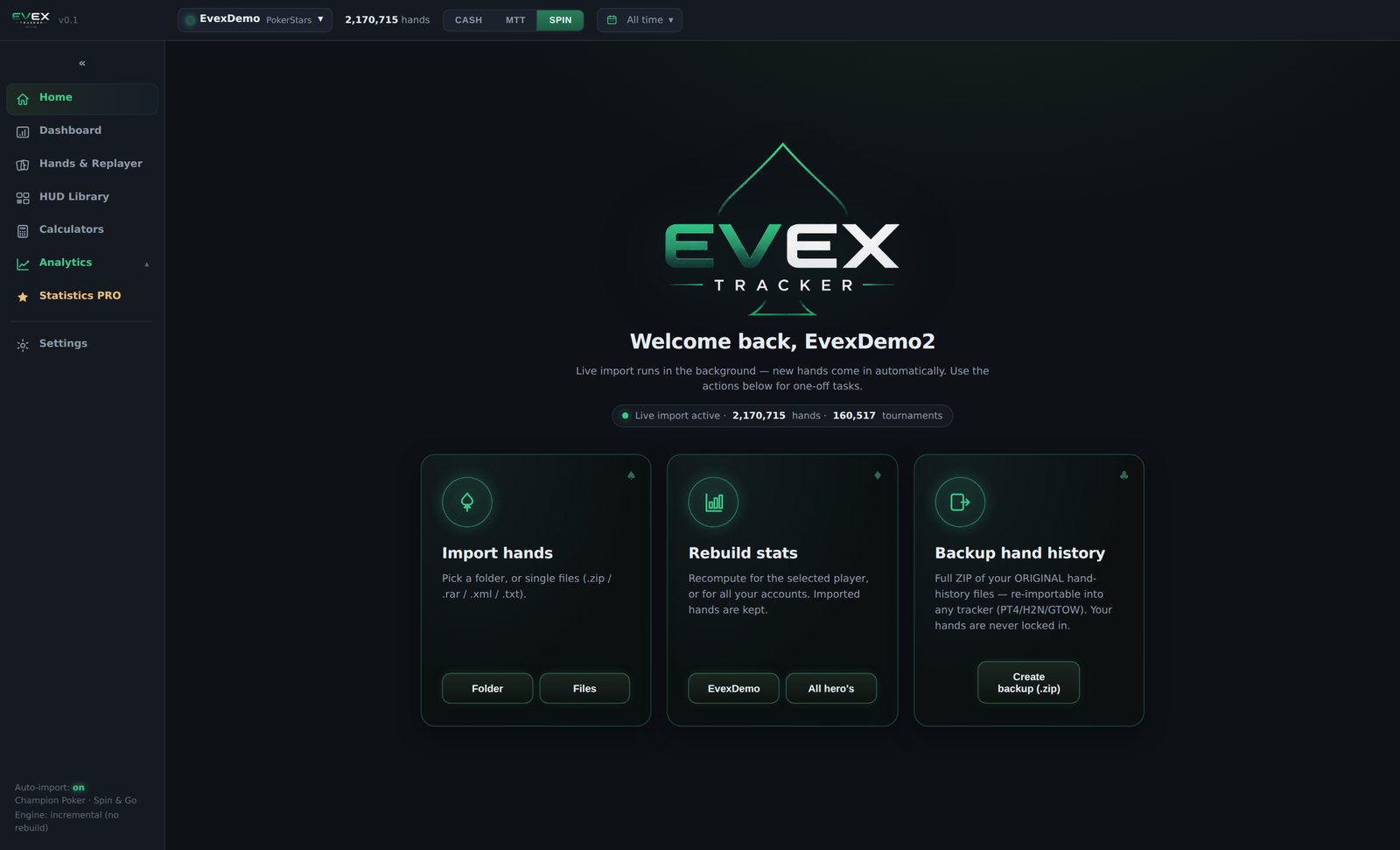
Import and database
Import and database
Results
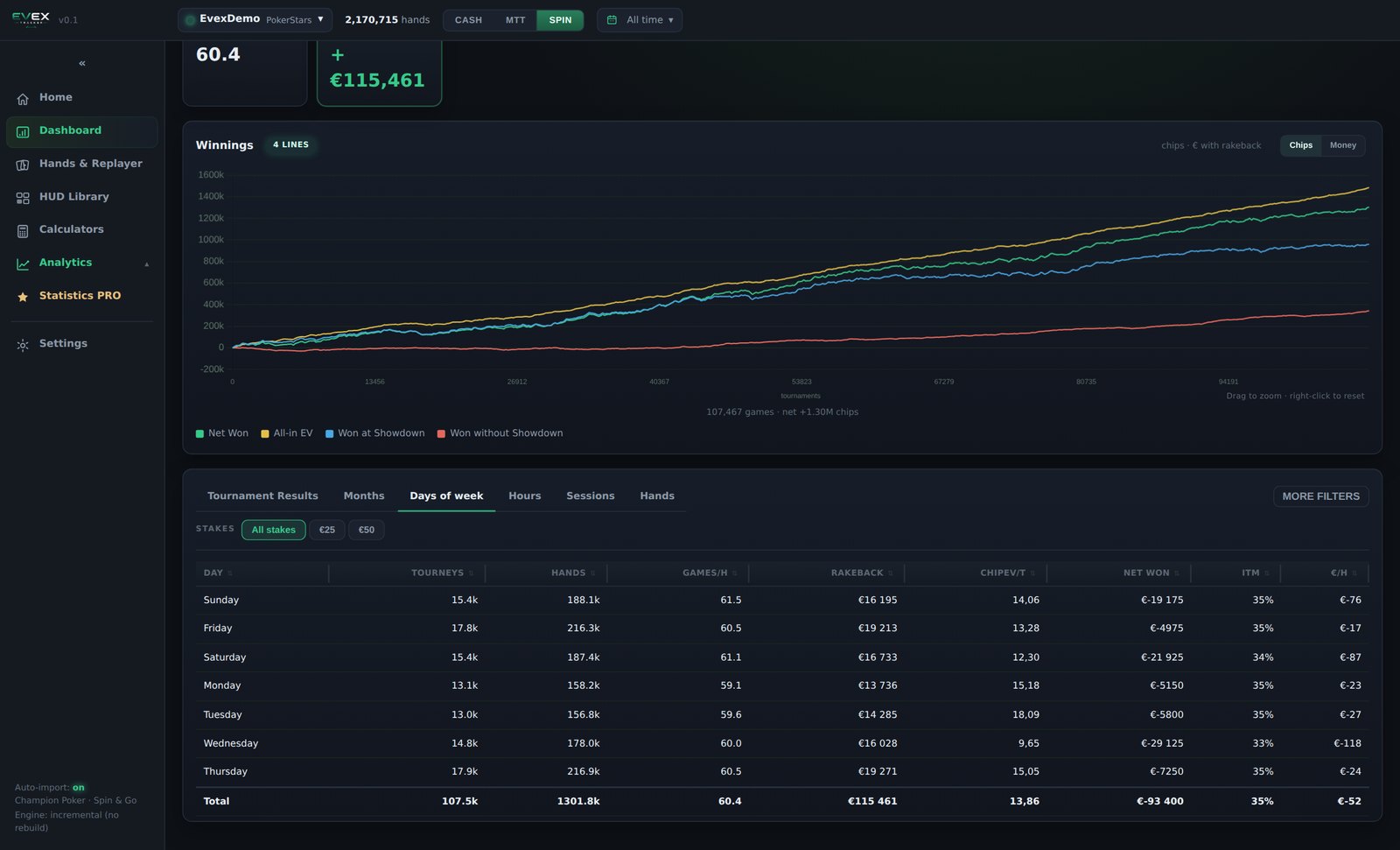
Results by day of week
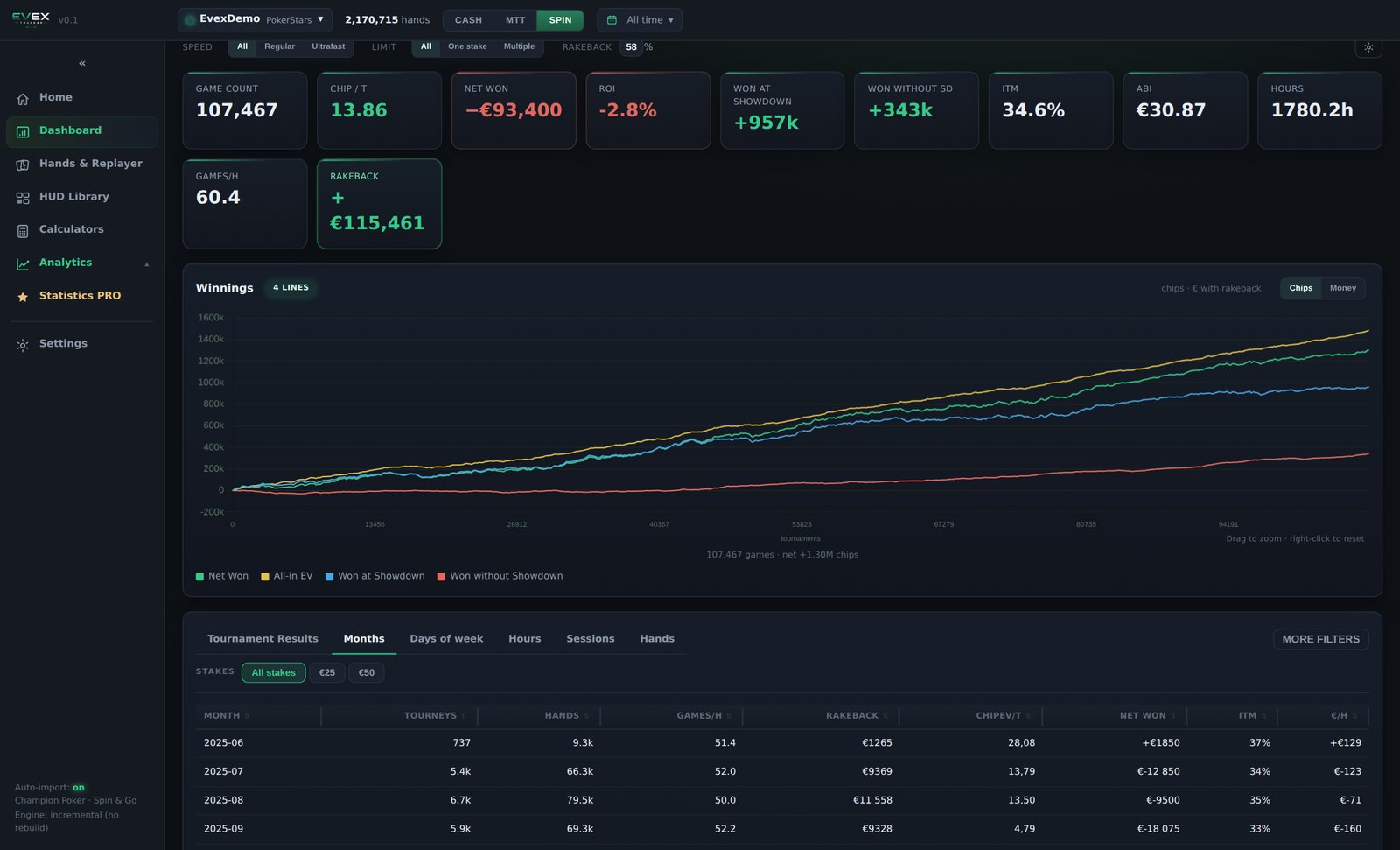
Months
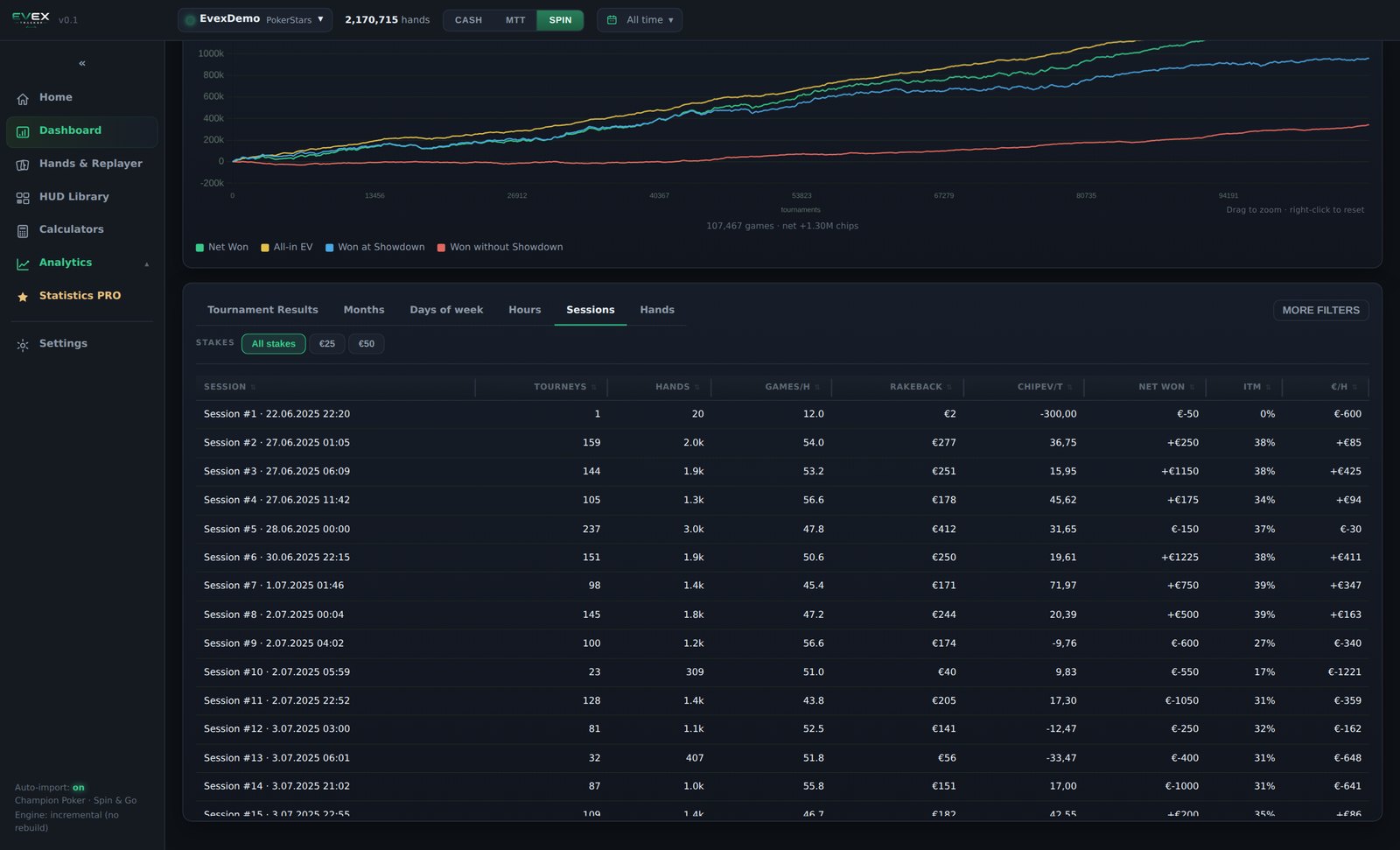
Sessions
Hands
Build a filter, hit Apply, watch the hands. The point of this screen is that setting it up takes seconds and the rest of your time goes into looking at poker.
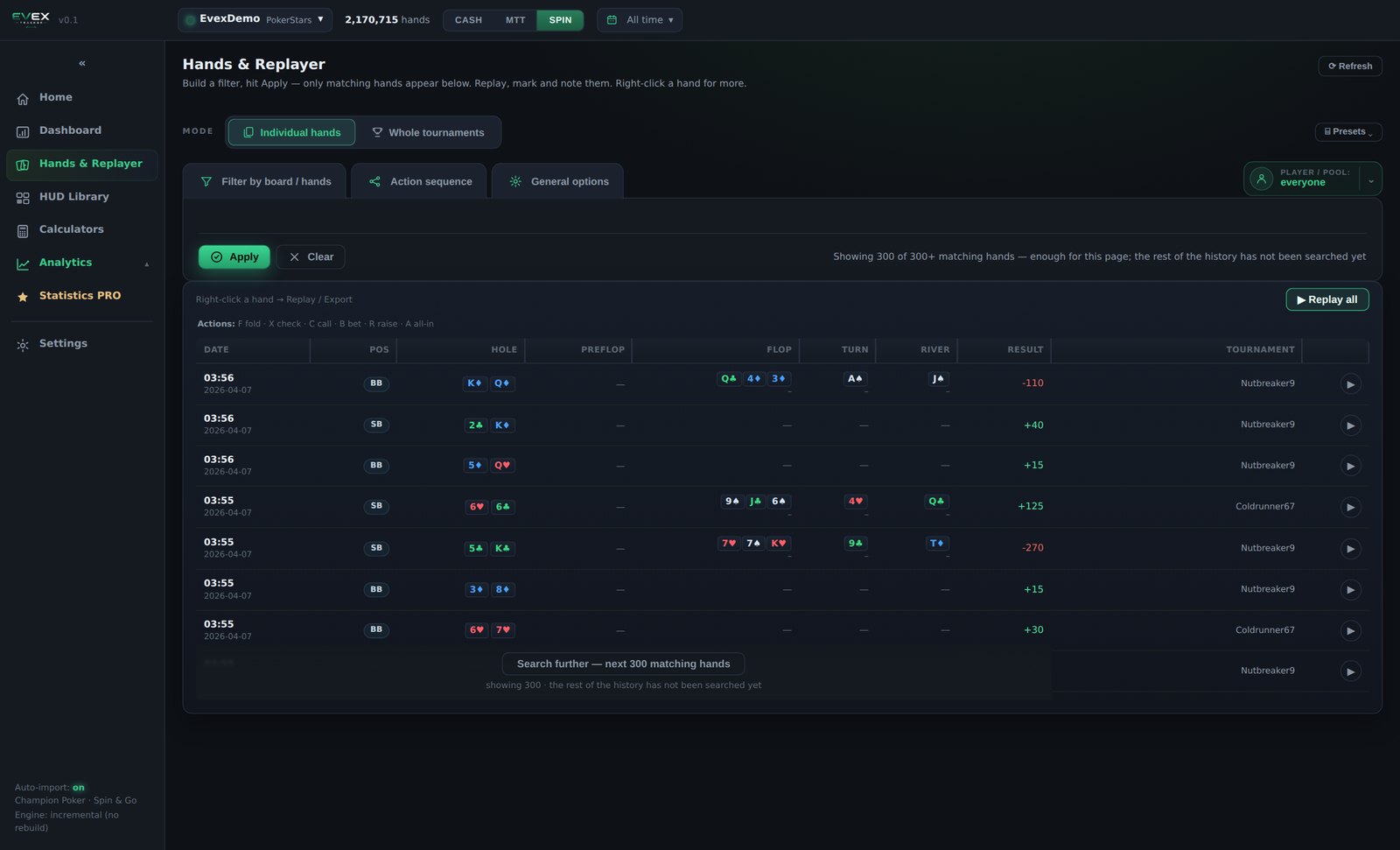
Date, position, hole cards, the action on each street, the board, the result and the tournament — every hand in the database, not a recent slice of it.
Your holdings on a 13×13 grid with drag-select, and your made hand from air through to a full house or better, on the street you care about.
Textures — wet, dry, connected, flush-draw, monotone, rainbow, paired, trips, open-ended, gutshot — each as a three-state chip: must be, must not be, don't care. Rank composition by exact count of low, medium and broadway cards. Or an exact flop, turn and river.
One player, a player list you built, or a minimum and maximum number of hands you hold on the opponents at the table.
Switch from individual hands to whole tournaments and filter by buy-in, by multiplier and by the two players you sat with. Replay a full tournament from the first hand to the bust.
The action filter is deliberately blunt: fold, check, call, bet, raise, all-in, picked per street. Two or three clicks describe a line that would take a minute to type anywhere else.
Game speed, table size, position, effective stack in big blinds, situation — won, lost, all-in, showdown — stake, date range and your colour marks.
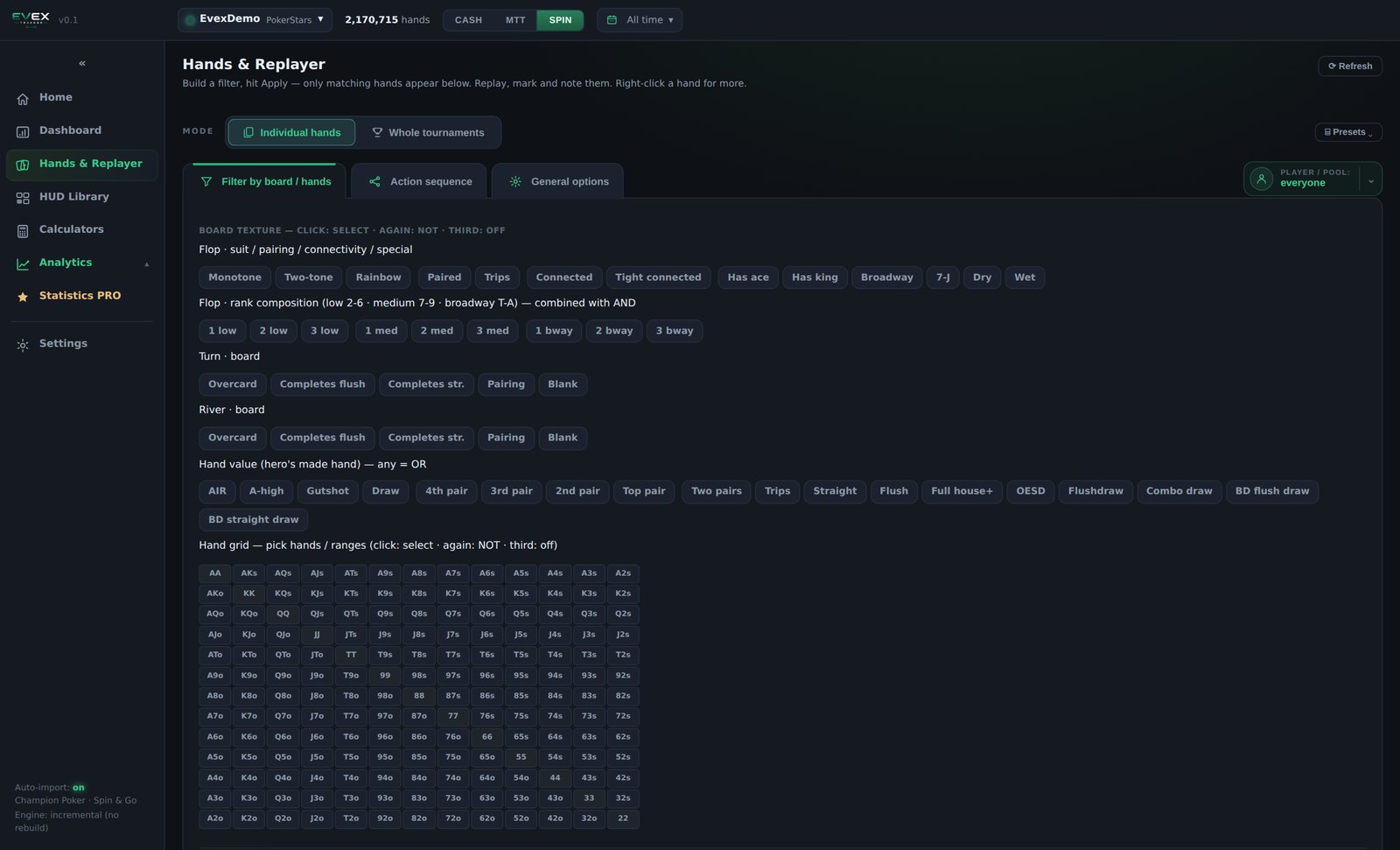
Board and hand filter
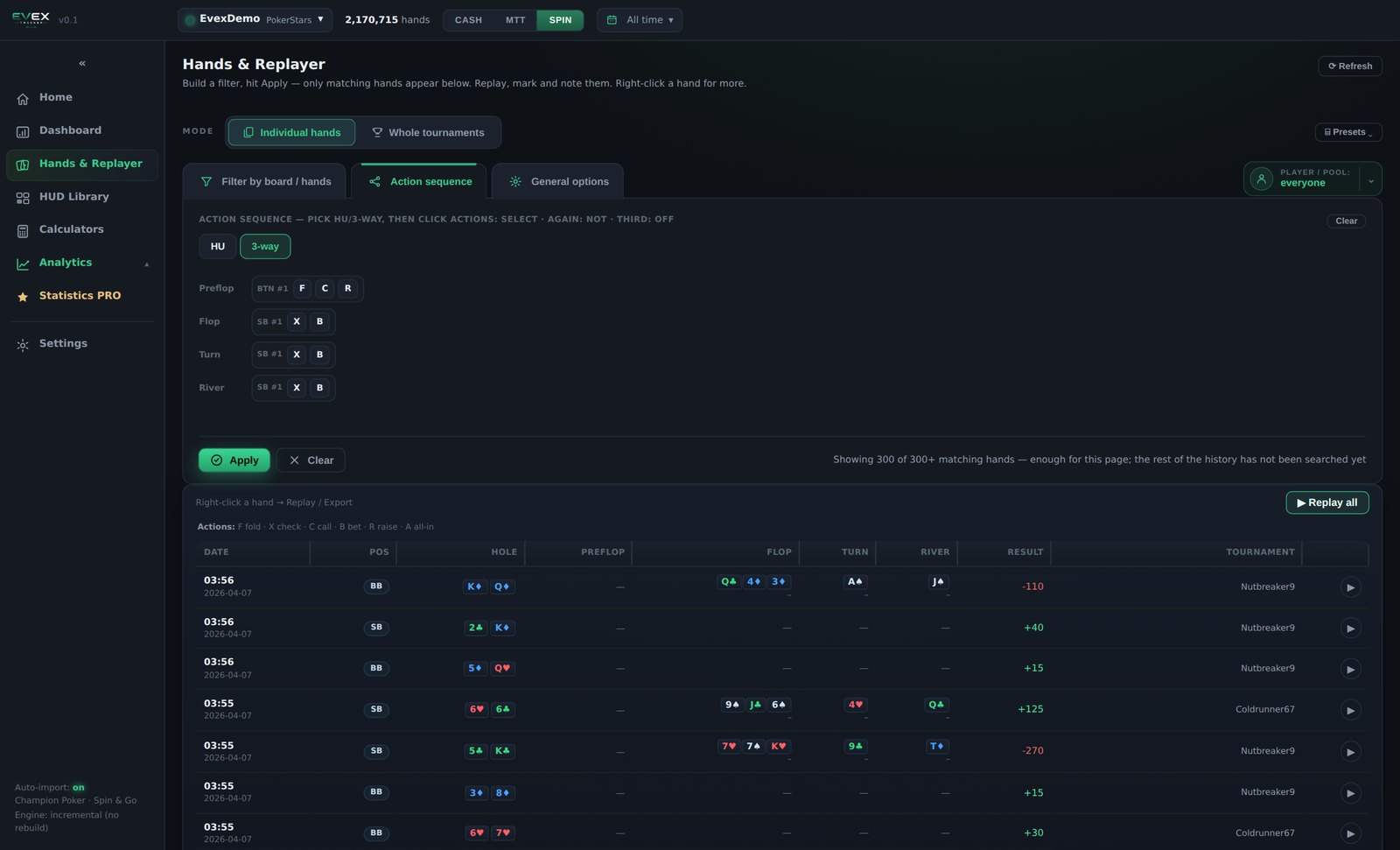
Action sequence — the whole line in a few clicks
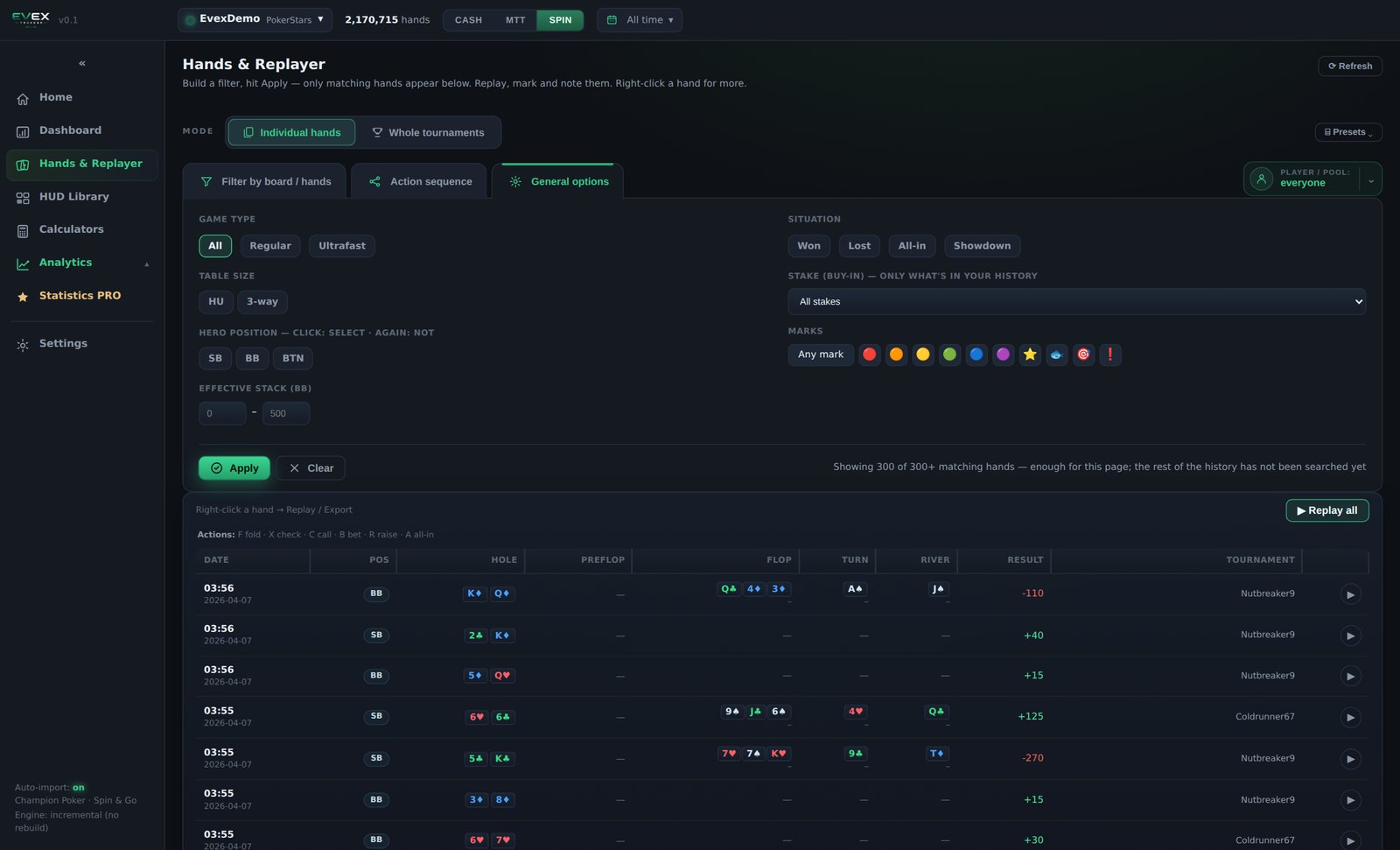
General options
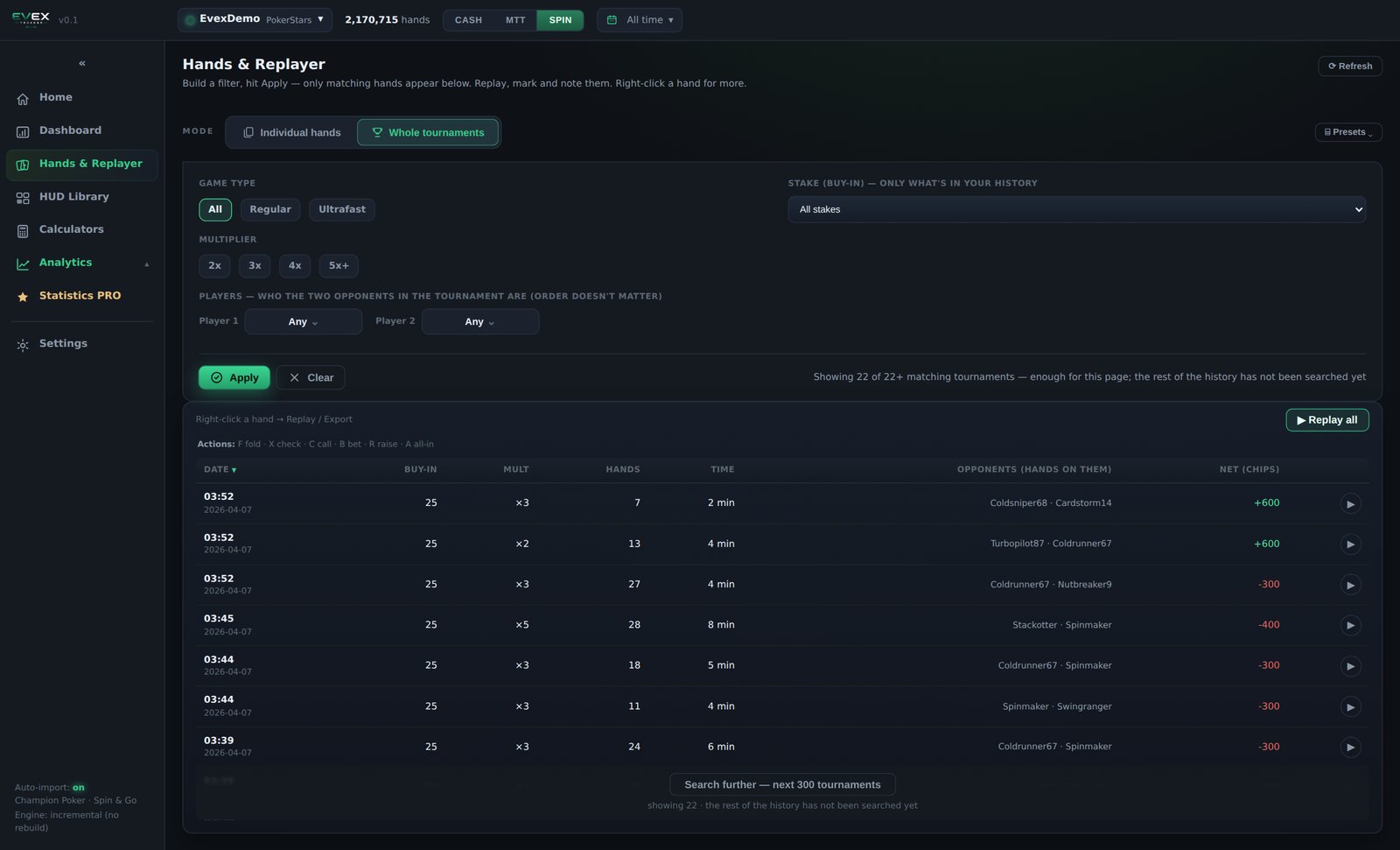
Whole-tournaments mode, filtered by buy-in, multiplier and the two opponents.
Whatever you filtered to opens as one queue, in the order the hands were played. Step through it, or let it play.
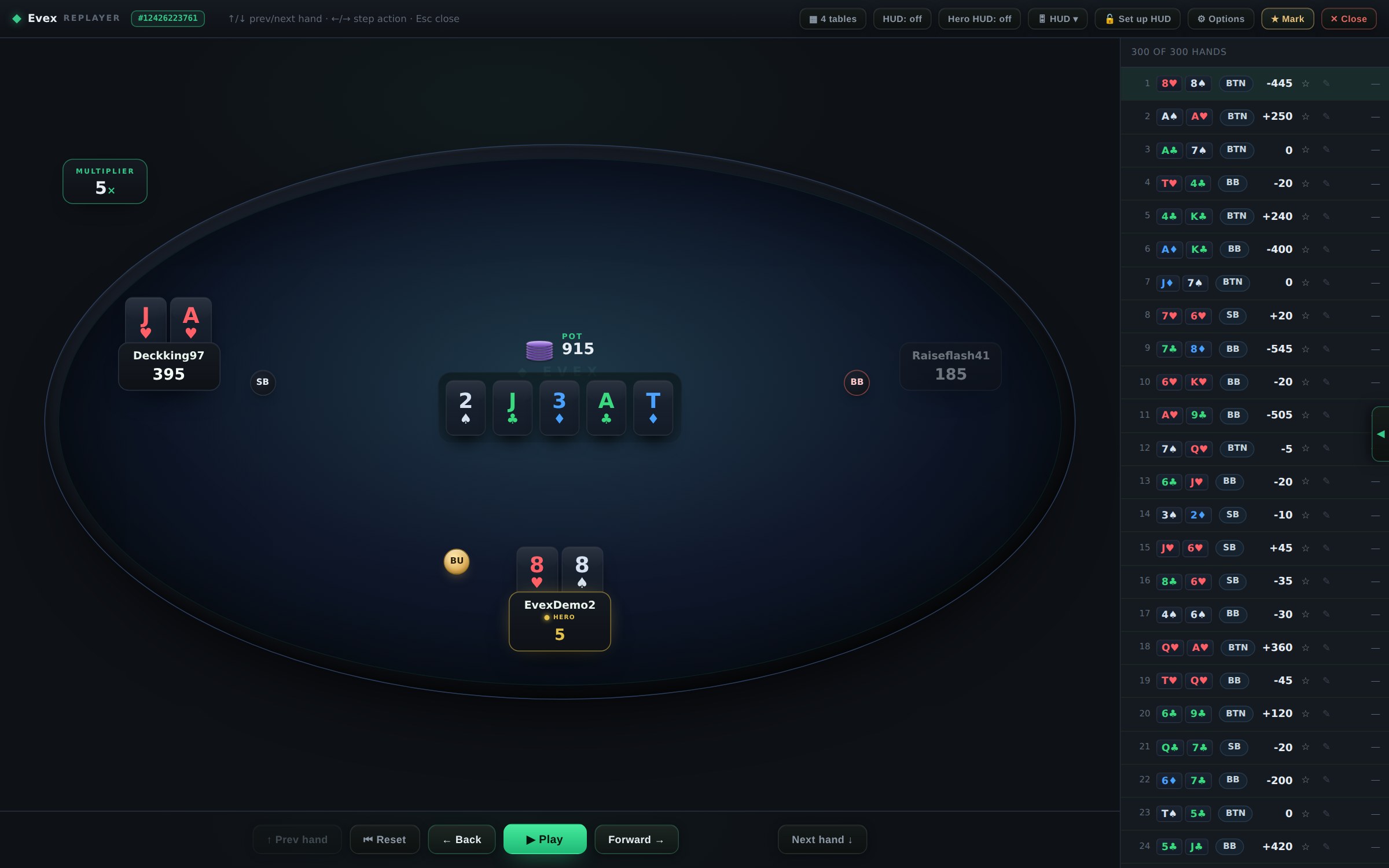
The hand plays back action by action, with the stacks, the pot, the sizing and the button where they were. The list on the right is the selection you came in with, so you move through the whole filter without going back to the table.
Forward and back through the hand, or press play. Previous and next hand move through the queue, Esc closes it.
When you want to get through volume fast, replay four hands side by side — each felt with its own step counter, stepped together or one at a time.
Switch the HUD on over the replayed table, for the opponents or for yourself, using any layout from the library.
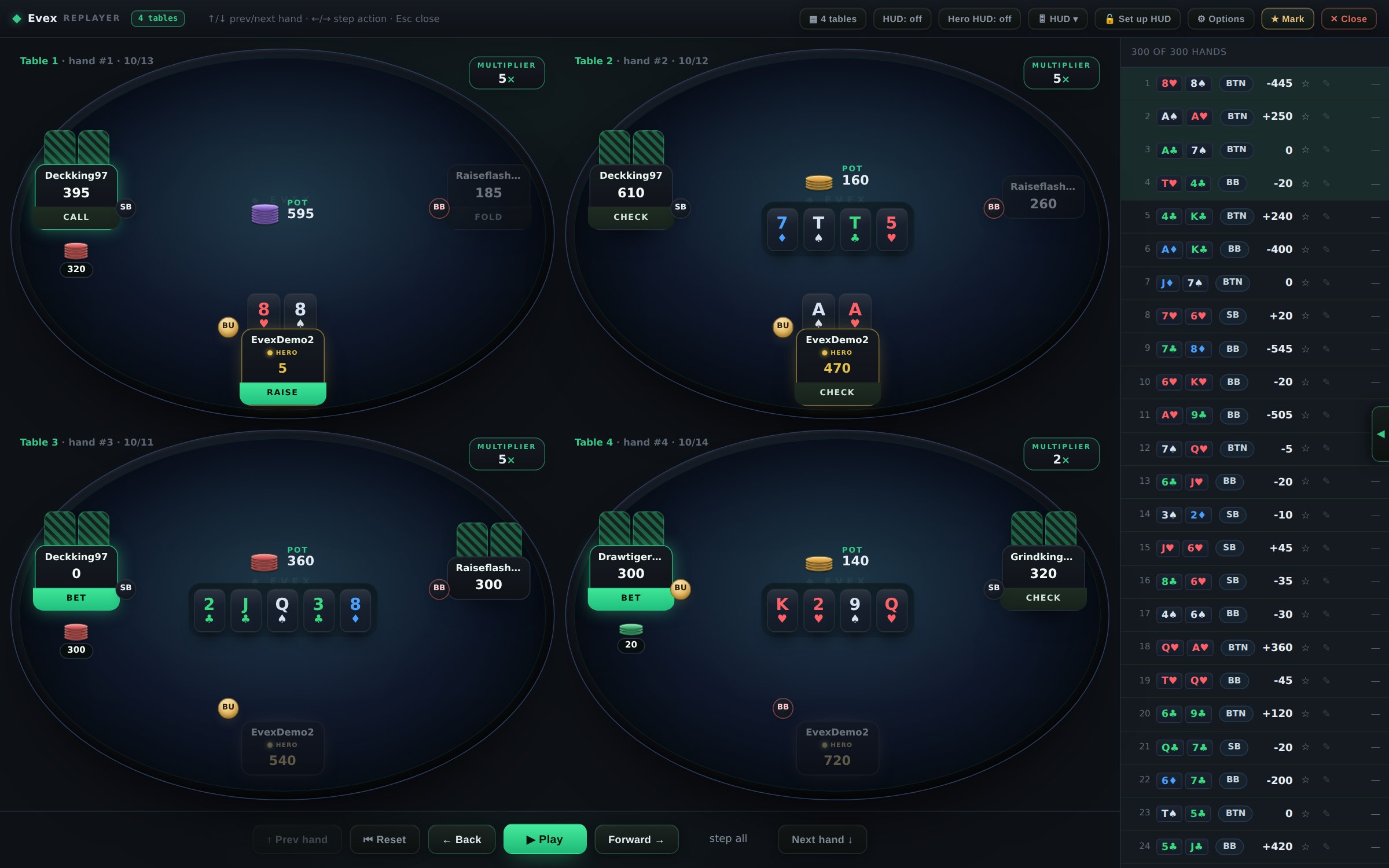
Four-table mode — the fastest way to review a session the way it was actually played.
HUD
Dozens of HUDs in the subscription, each with its own skin variants and a pop-up attached to it. No HUD store, nothing sold separately — and new layouts and pop-ups keep being added.
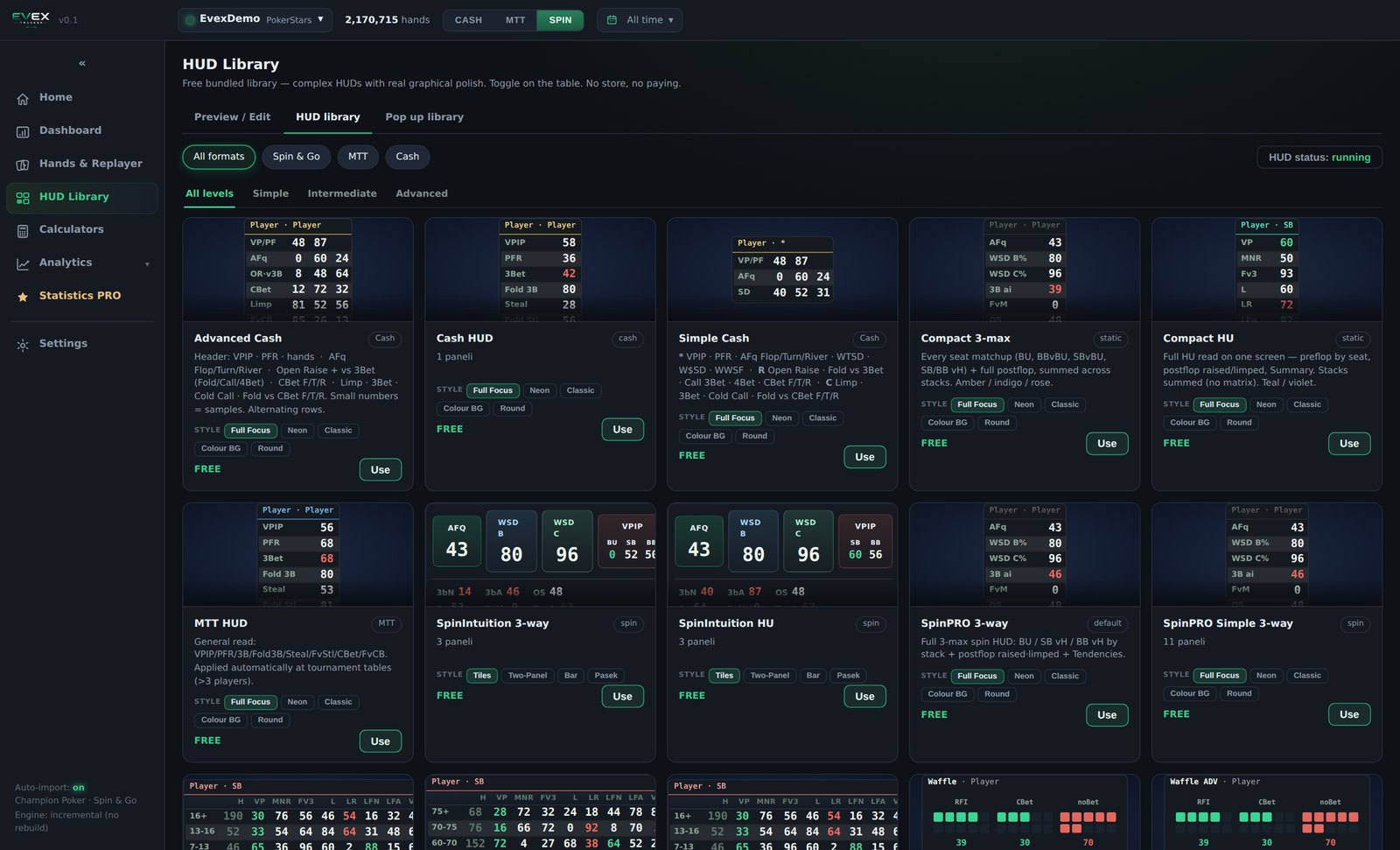
The library — filter by format and by level, press Use on a card
Lay your HUD out on a table before you sit down. Live preview draws the whole layout exactly as it will appear at the table, so you can move each panel, resize it and test the pop-up attached to it — without waiting for a hand to be dealt.
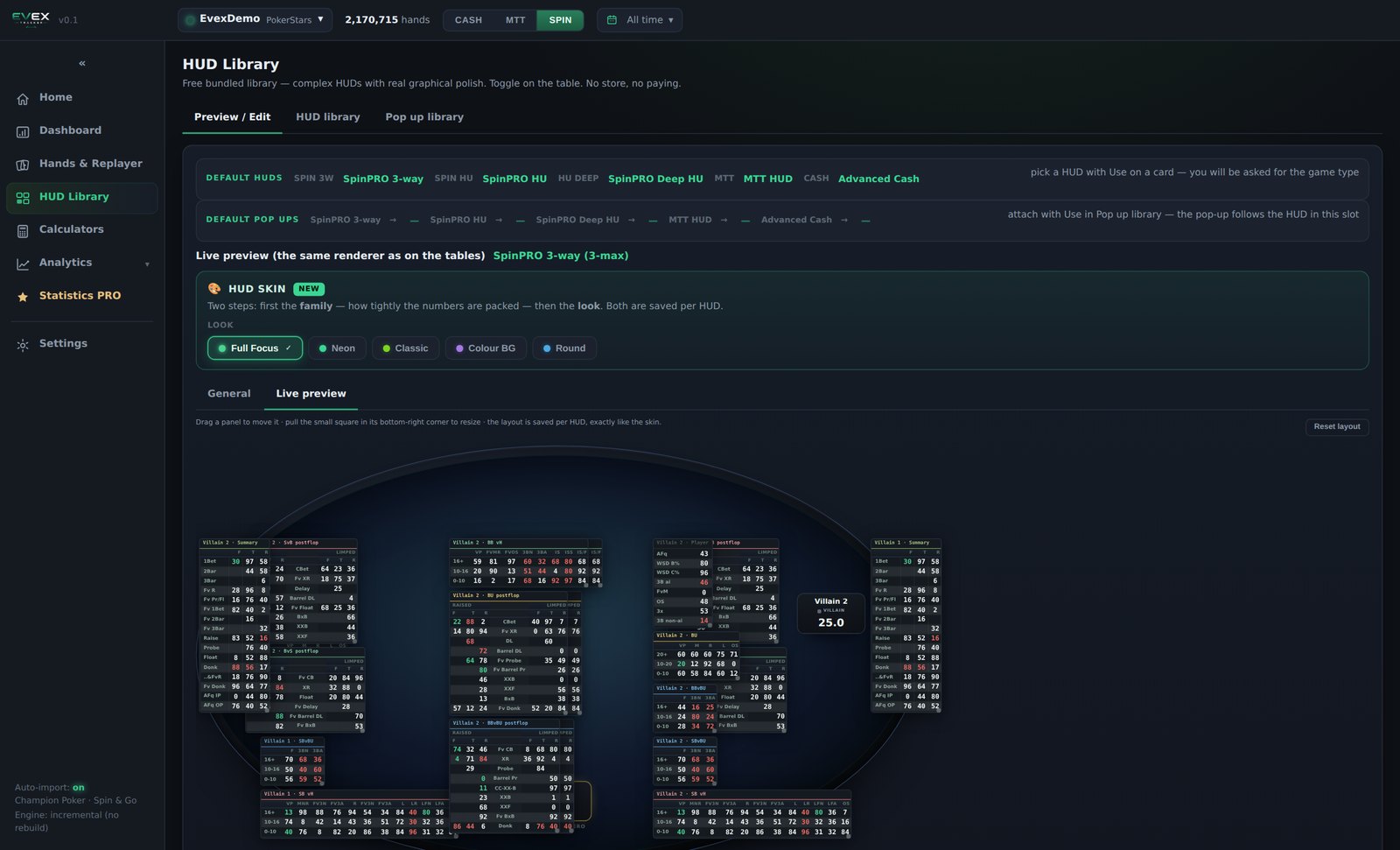
Preview / Edit — pick a HUD at the top, choose its skin, and the Live preview tab draws the whole layout on a three-max table with the same renderer that runs at the tables. Drag a panel to move it, pull the corner to resize it, and click a statistic to open the pop-up attached to that slot. The layout and the skin are saved per HUD.
Any pop-up attaches to any HUD. Clicking a statistic on the overlay opens that same stored statistic, broken down.
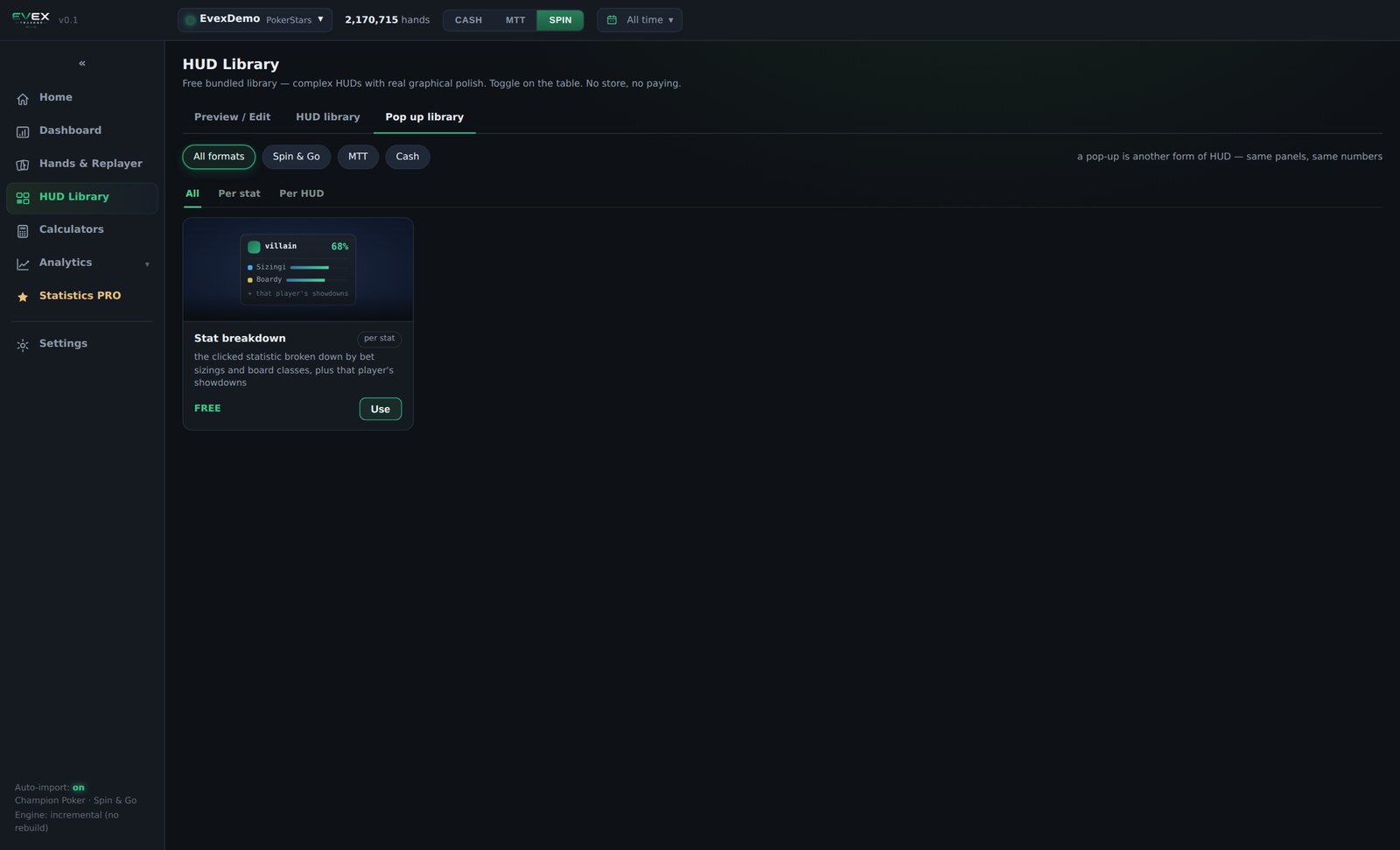
Pop-up library
Analysis
Pick who you want to look at, narrow it to the hands that matter, compute it once — and then read it, with the sample count under every figure.
A subject is one specific player, or a group you define by statistics. The builder shows who matches while you set the thresholds, with their hand counts, and lets you drop individual players out by hand.
Not a fixed list. Add statistic and filter on any statistic the program computes — the same ones that feed the HUDs. Stack the criteria and a player has to satisfy all of them.
This is the part that makes a group mean something. Every criterion carries its own minimum sample. Looking for aggressive recreational players with AFq above 70? Without a threshold you catch everyone who has played two hands, where 70% means nothing at all. Set the sample for that statistic and you get the players who are actually aggressive.
Point the whole screen at a single opponent instead of a group. Every table, panel and replay below then answers for the hands you played against that person.
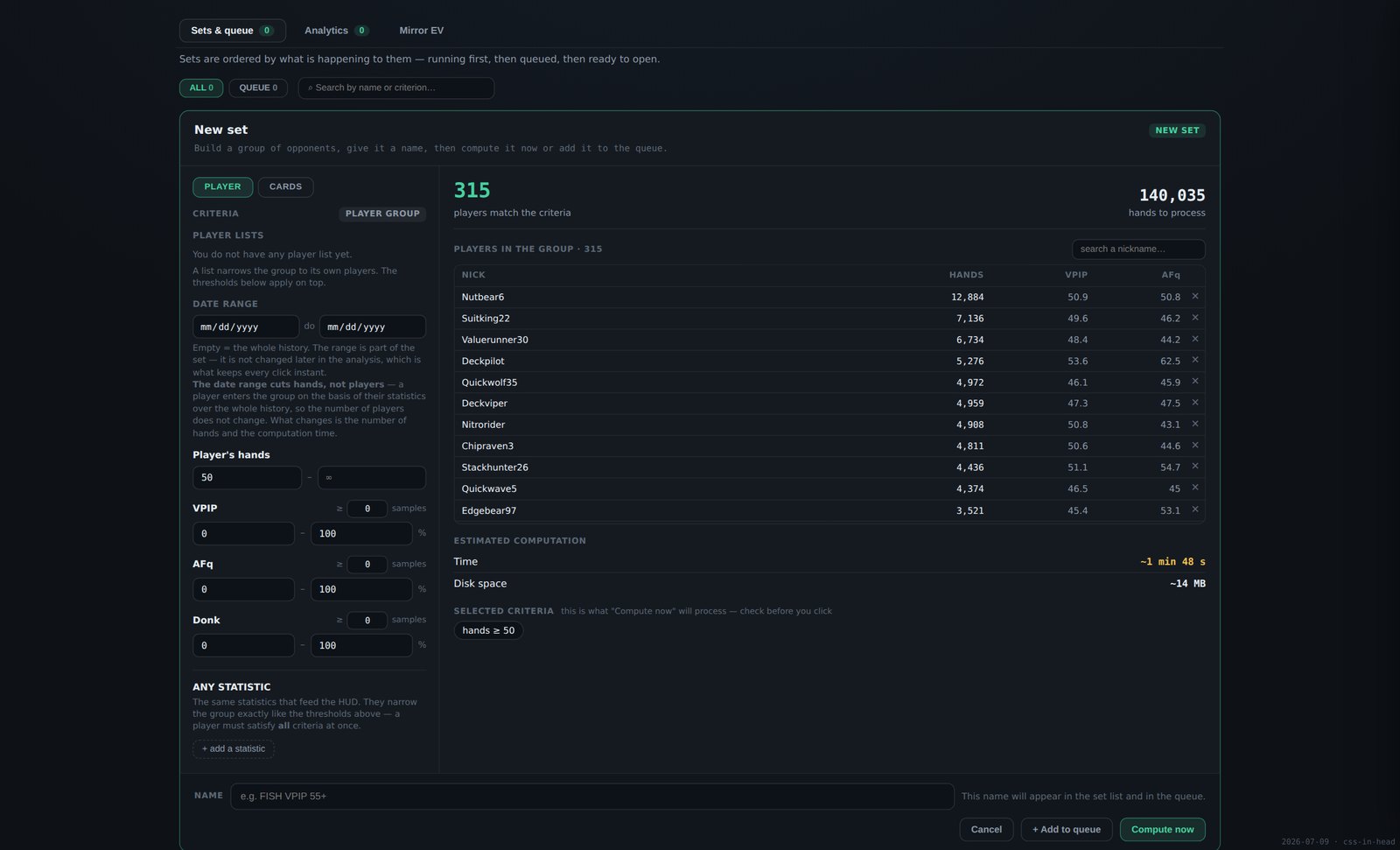
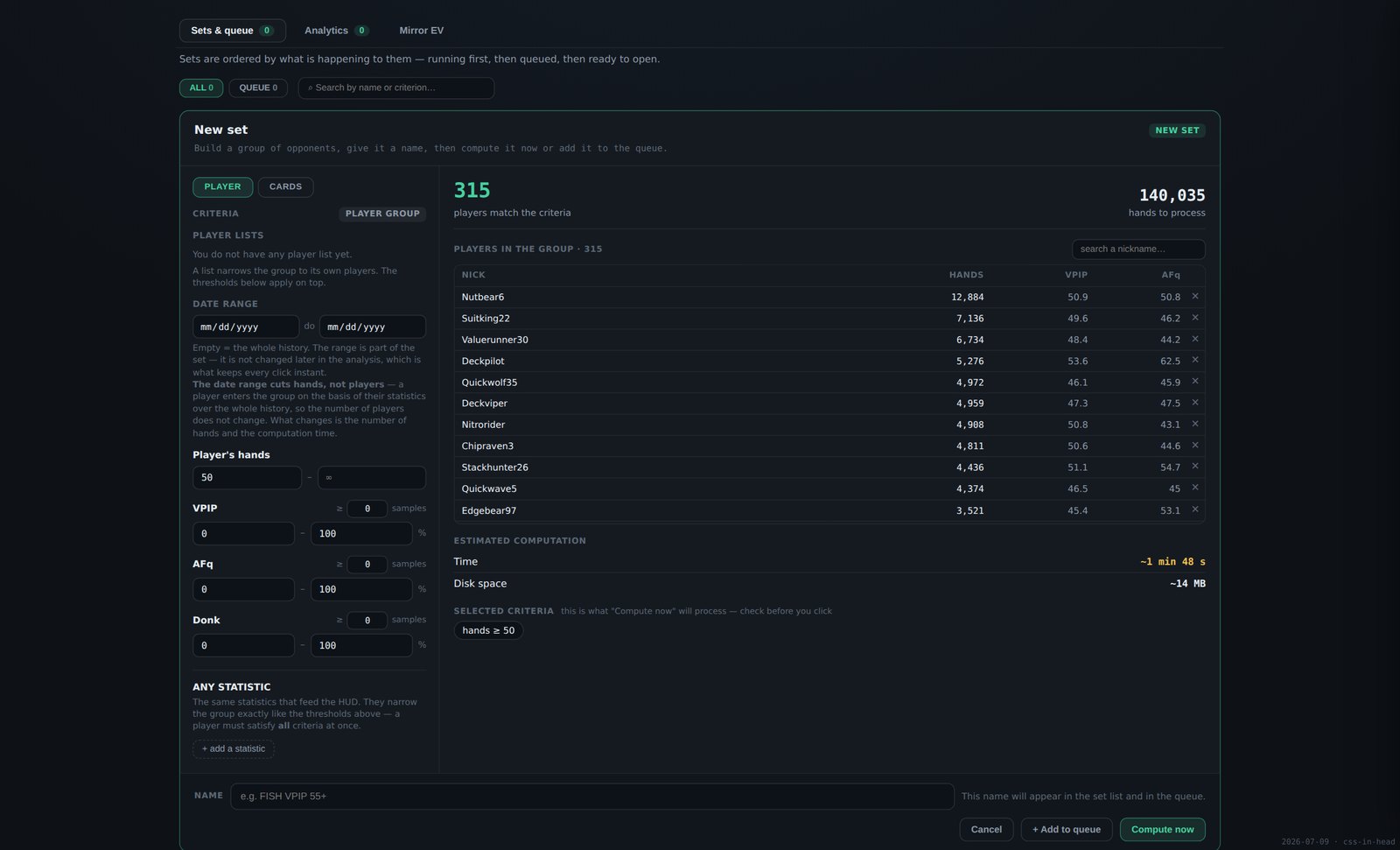
Player lists, date range, hand count, VPIP, aggression frequency, donk and any HUD statistic — each with its own minimum sample. Presets for regulars and recreational players. On the right: the 315 players that match, and the 140,035 hands that will be processed.
The second tab of the same builder is the card filter. It cuts hands, not people — the group stays the same, only which hands feed the figures changes.
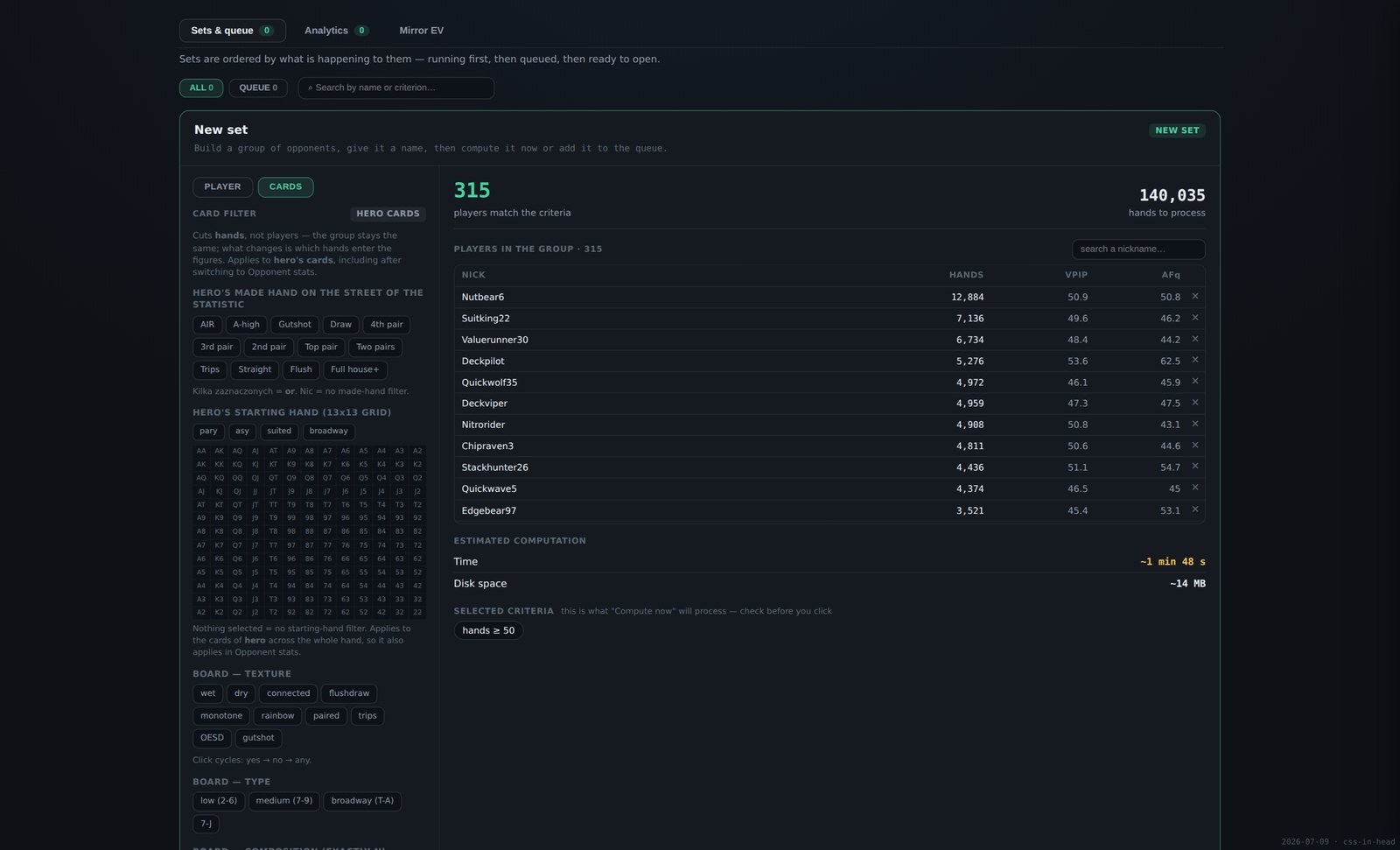
Your made hand on the street of the statistic; your starting hand on a 13×13 grid; board texture as three-state chips — wet, dry, connected, flush-draw, monotone, rainbow, paired, trips, open-ended, gutshot, each cycling yes → no → any; board type low, medium or broadway; board composition by exact count; and a specific flop by three ranks with any suits. Several picks inside one block mean OR; blocks combine with AND.
Resolving a group into hands is real work, so the builder prices it before you start: how many players, how many hands, roughly how long, how much disk. Then compute it now — or stack several sets in a queue and walk away.
That is how you use it in practice. Queue up aggressive recreationals, passive recreationals, the whole population, and the one regular you have a big history against. Start it, go and make a coffee, and a few minutes later you have every one of those groups computed and waiting.
Three bands, in the order things happen to them: running now — with the real count of answered queries and a time left, not an animation; queued — each set with its place in the line, movable to the top or removable; ready to open — newest first, with when it was computed and a button straight into the analysis or into Mirror EV. You can close the screen and walk away; the queue keeps going.
A computed set is written to disk and stays there. Open it whenever you like and every click answers in under a second — the tables, the panels, the board frequencies, all of it — because the work was already done once. Sets can be renamed, recomputed or deleted, and you can keep as many side by side as you want.
With the set open, the preflop tables read the whole selection at once: effective stack down the rows, the branch of the hand across the columns, and the sample under every figure.
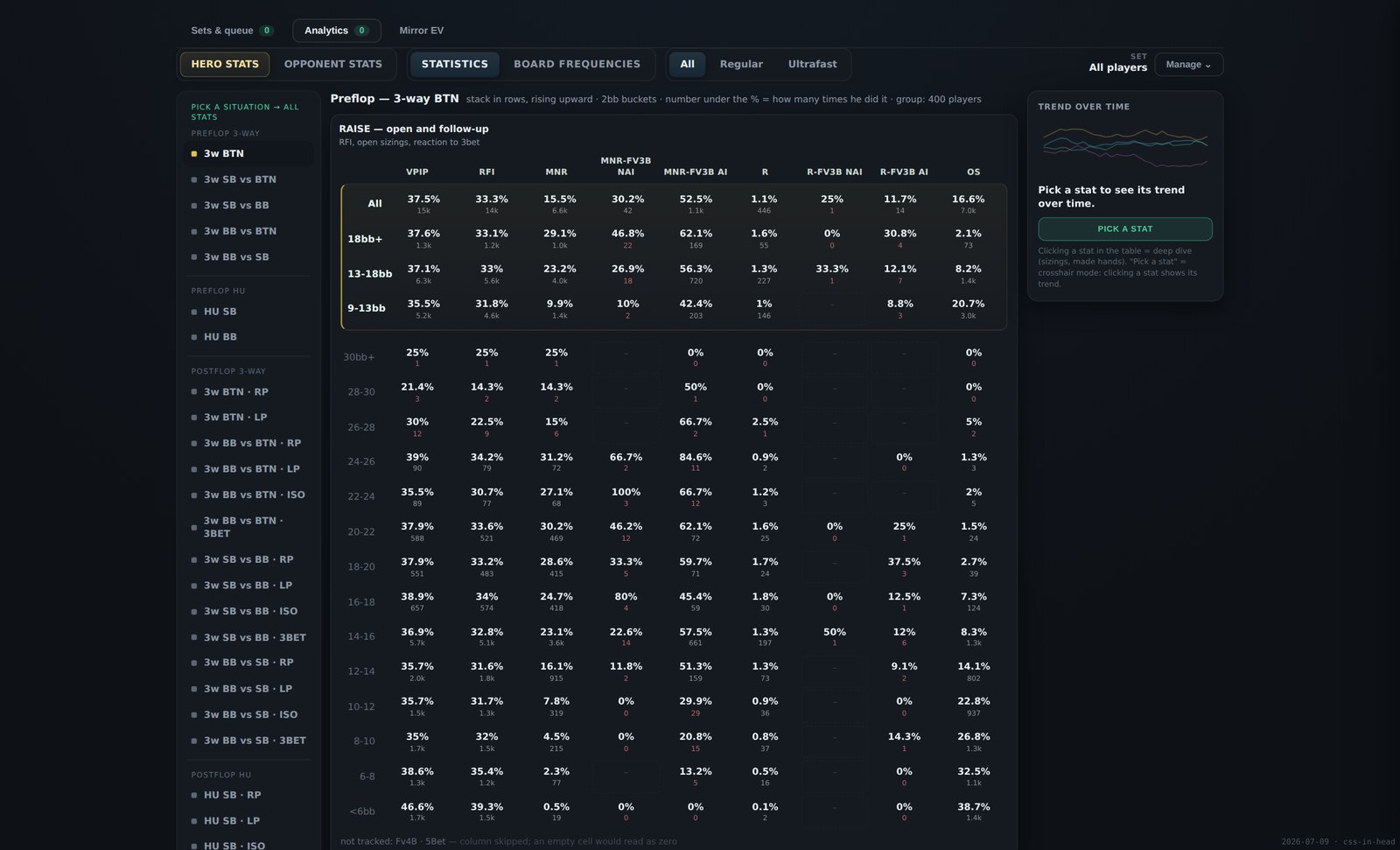
Preflop · 3-way BTN. Effective stack in rows, the raise branch in columns, sample under each figure.
Seven situations: 3-way BTN · SB vs BTN · SB vs BB · BB vs BTN · BB vs SB · HU SB · HU BB. Blind-vs-blind hands are kept in their own table so a BB-vs-BTN number is never mixed with a blind war.
Four column groups, each on its own denominator. Raise: VPIP, RFI, min-raise, raise, open-shove, and fold to a 3-bet split by the size you opened and by whether the 3-bet was all-in. Versus raise: fold and call versus min-raise, versus raise and versus open-shove, 3-bet overall, all-in and non-all-in, and squeeze. Limp: limp, limp-raise, limp-fold versus a non-all-in and versus an all-in iso. Versus limp: iso, iso all-in, and fold to a limp-3bet.
Rows are effective stack: under 6bb, then 2bb steps to 30bb, then 30bb+, with 9–13, 13–18, 18bb+ and All as roll-ups. A column the engine does not track is listed as not tracked rather than shown as zero.
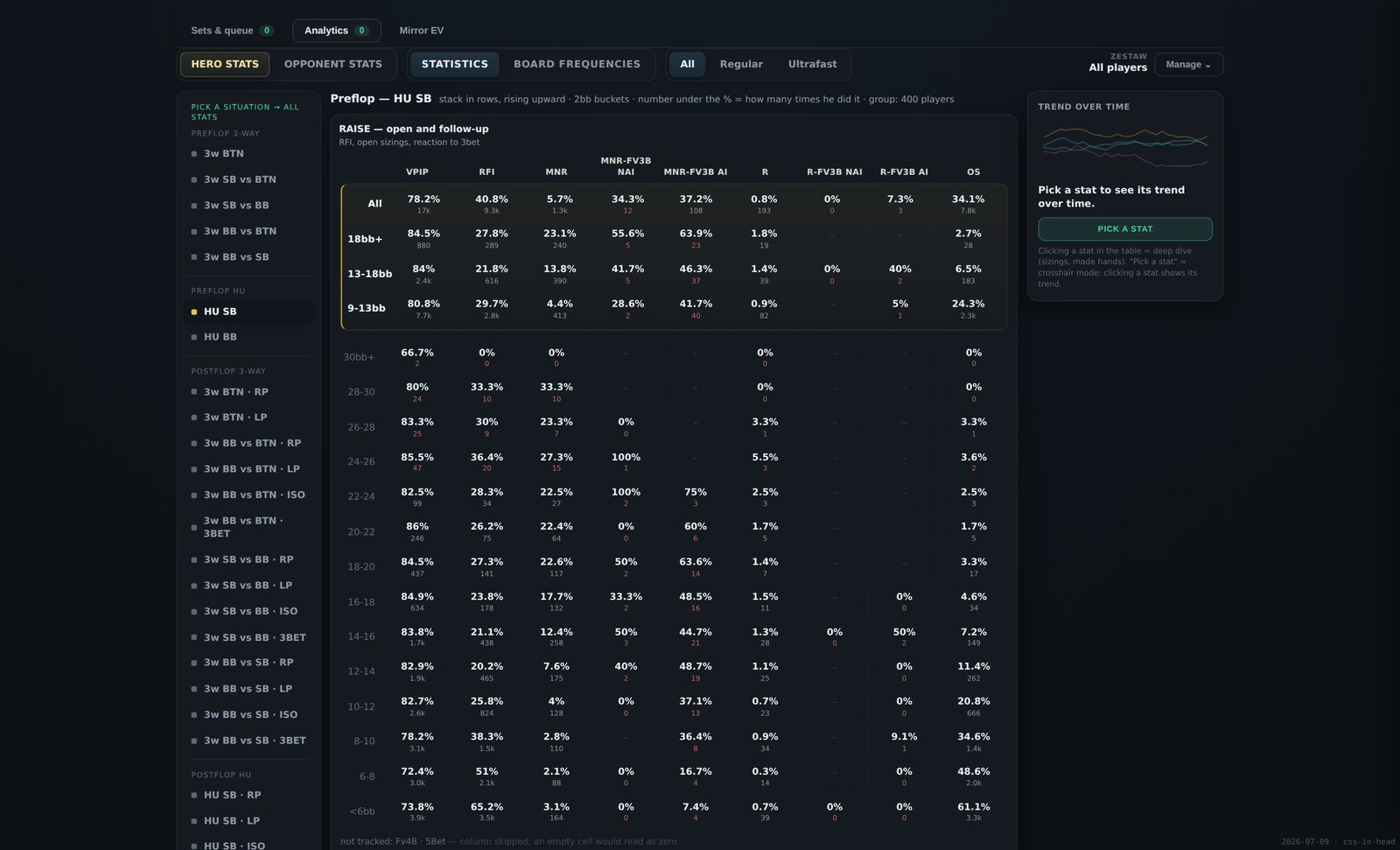
Preflop · HU SB. Heads-up hands live in their own tables, so a blind war never lands in a three-way number.
The same selection, read street by street. Flop, turn and river across the columns; the lines available in your role in the pot down the rows.
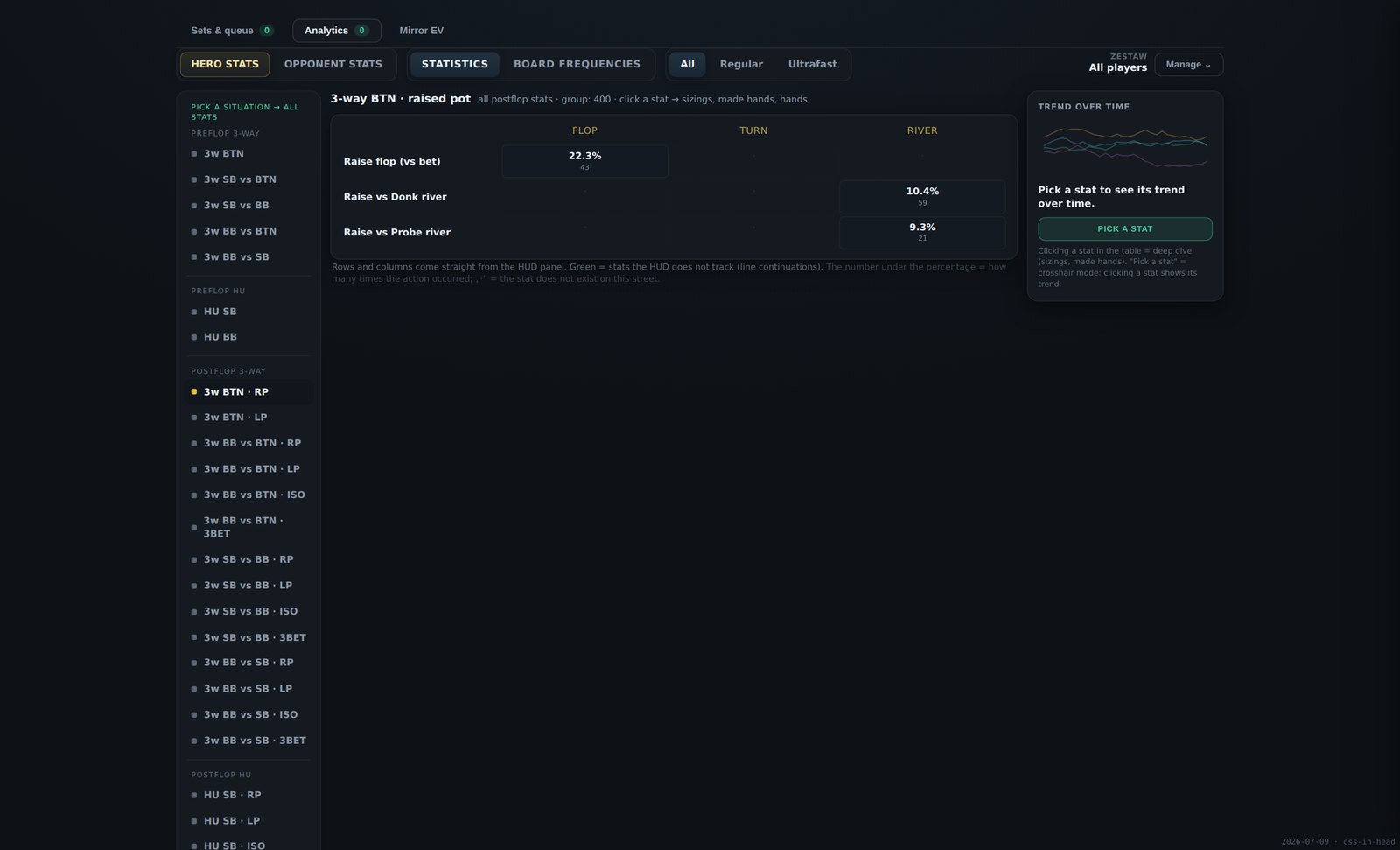
Postflop · HU SB, 3-bet pot. Aggressor lines above, defender lines below, the sample under every figure, and a dot where a statistic does not exist on that street.
Twenty-two contexts: each matchup crossed with RP raised LP limped ISO iso 3BET 3-bet pots.
Columns are flop, turn and river. Rows follow the role you had in the pot: as the aggressor — c-bet, fold to check-raise, delayed c-bet, delayed barrel, fold to float, fold to probe, fold to donk, check-check-bet, bet-check-bet; as the defender — fold to c-bet, check-raise, float, fold to delayed c-bet, fold to delayed barrel, probe, donk. Raise-versus-bet on the flop and the river raise lines are always included.
A cell with fewer than 30 observations is marked weak; a statistic that does not exist on that street shows a dot rather than a zero.
Clicking any figure in any table opens the panel on the right. It is built differently for preflop and for postflop, because the two need different breakdowns.
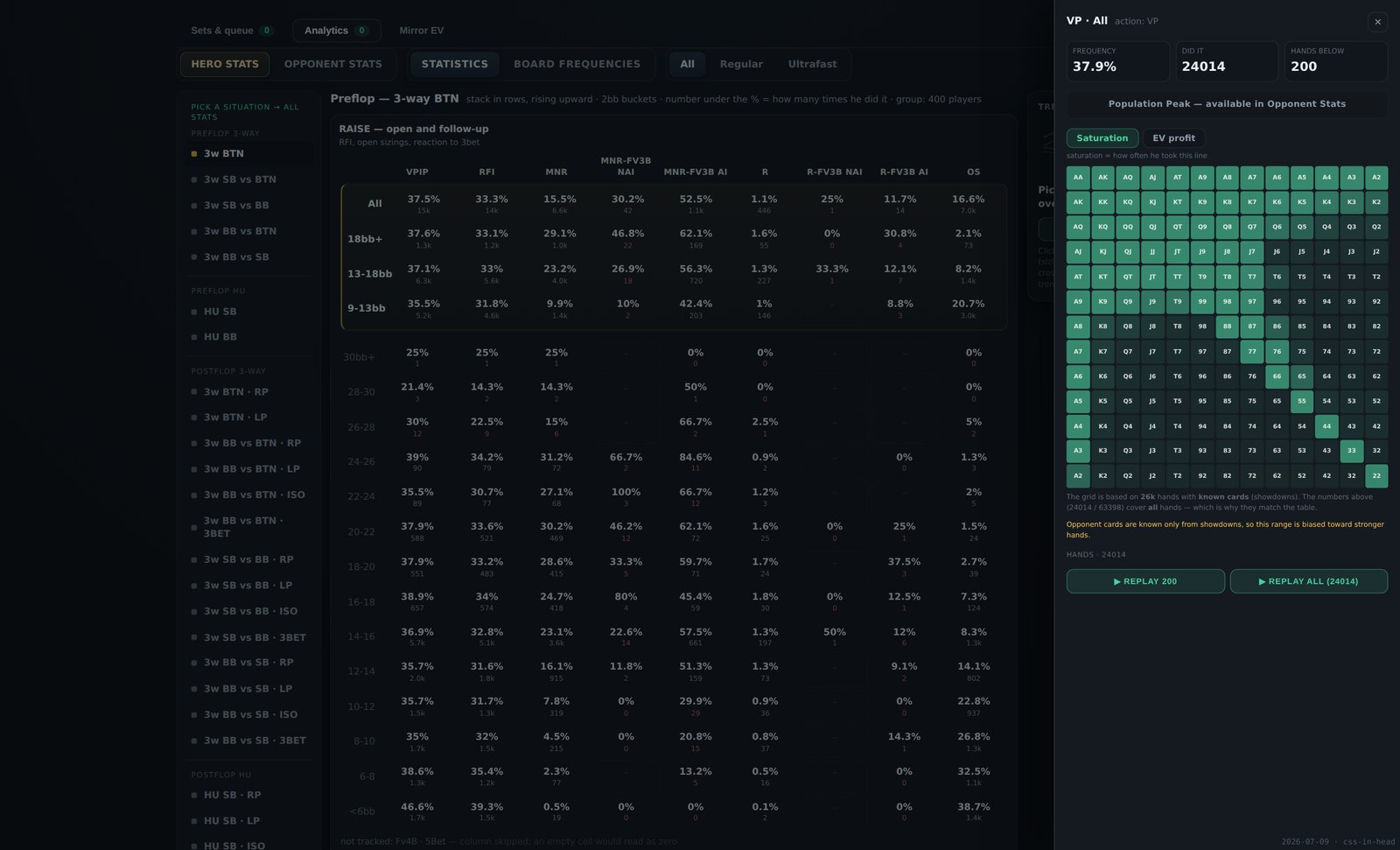
Preflop · VPIP on the button — 37.9%, with the number of occurrences and the hands listed below. Switch the grid to EV profit and every square shows what that holding actually earned in this exact spot.
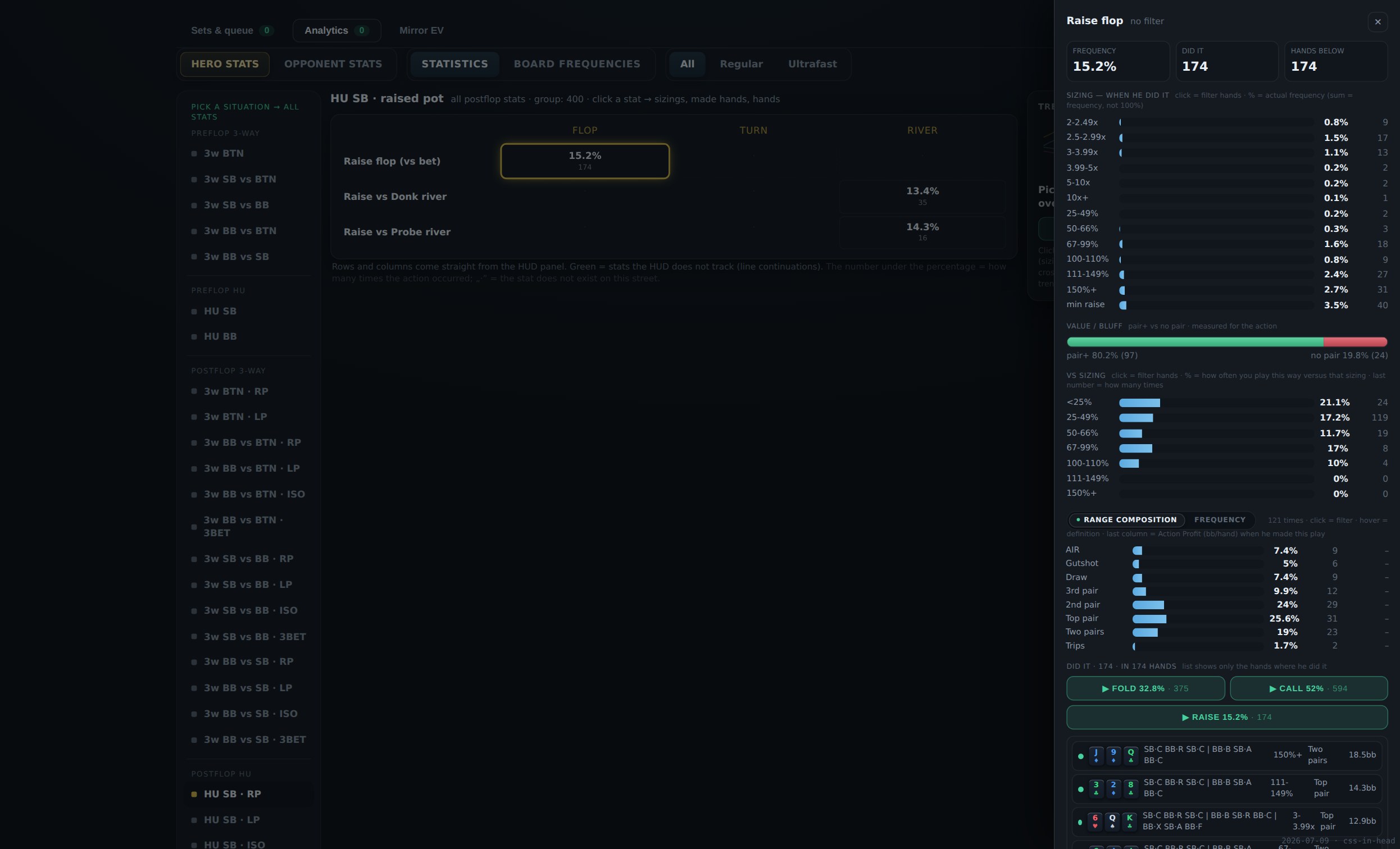
Postflop · c-bet on the flop, HU SB in a raised pot — 65.8% over 1,197 occurrences, broken down by the size used, the size faced, range composition and what happened next.
A cell, a sizing bucket, a made-hand class, a square of the 13×13 grid, a row of the hand list — whatever you narrowed it to, the hands behind it open as one queue in the replayer, in the order they were played. You never rebuild a filter to watch what you were just reading about.
The same database read by board instead of by situation. Every flop in the game is sorted into thirteen classes — trips, paired with a higher or lower kicker, monotone connected or spread, wet with an ace, wet broadway, wet other, dry with an ace, dry with two or one broadway cards, dry low — and each class is shown by a representative flop with the numbers counting the whole class.
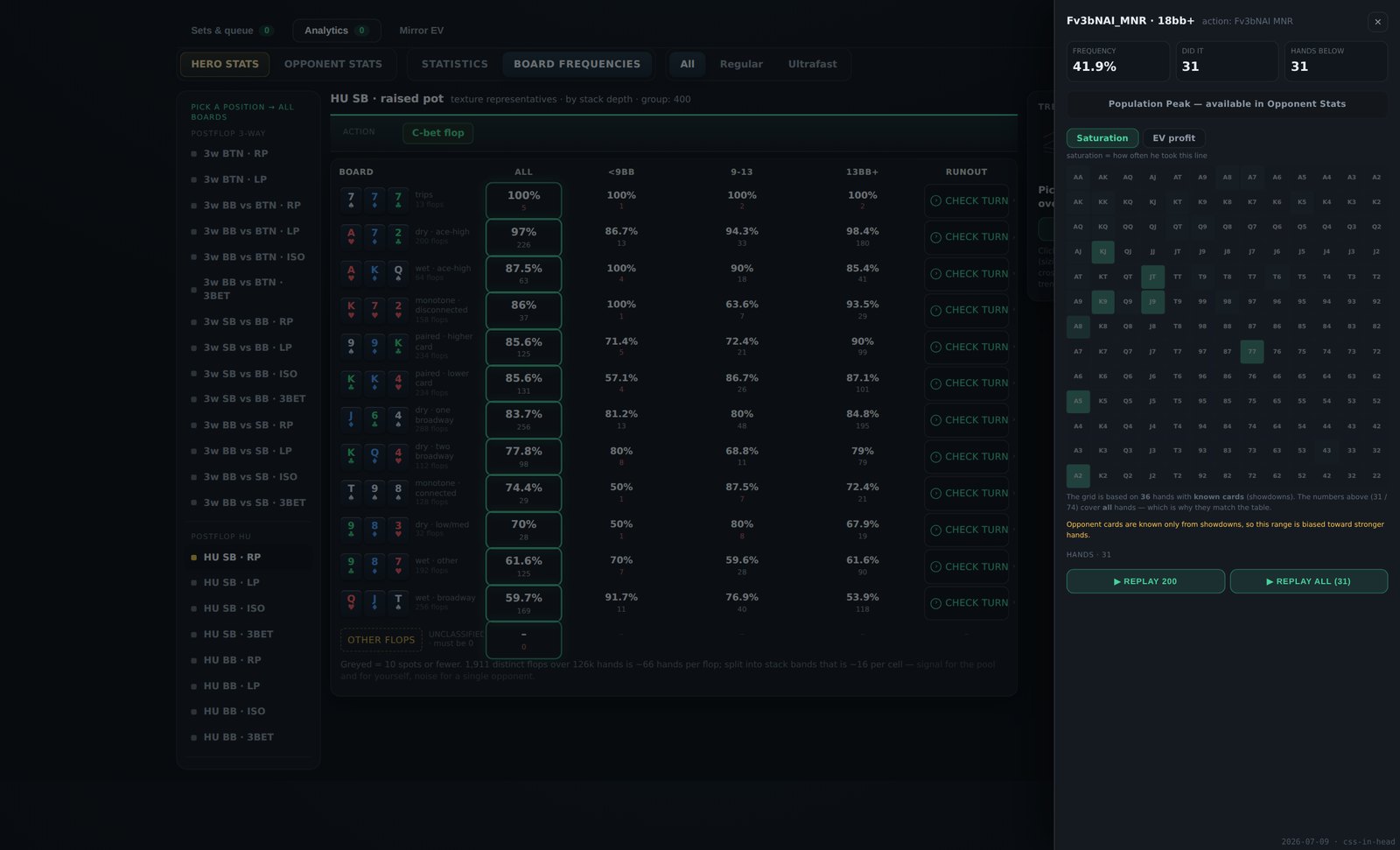
Columns are stack bands: under 9bb, 9–13bb, 13bb+, plus a combined column. The statistic follows your role in the pot — c-bet when you were the aggressor, fold-to-c-bet when you were defending. "Check turn" carries the same set of flops to the turn and sorts the run-outs into pairs the board, brings a flush, brings a straight, overcard or brick, and again to the river.
The same set, seen from your seat or from theirs.
How you played against that group — every view, every spot, every stack band, filtered to the hands where they were the ones across the table.
How they played against you — the same views, the same spots, built from the hands you were in rather than from a pool average.
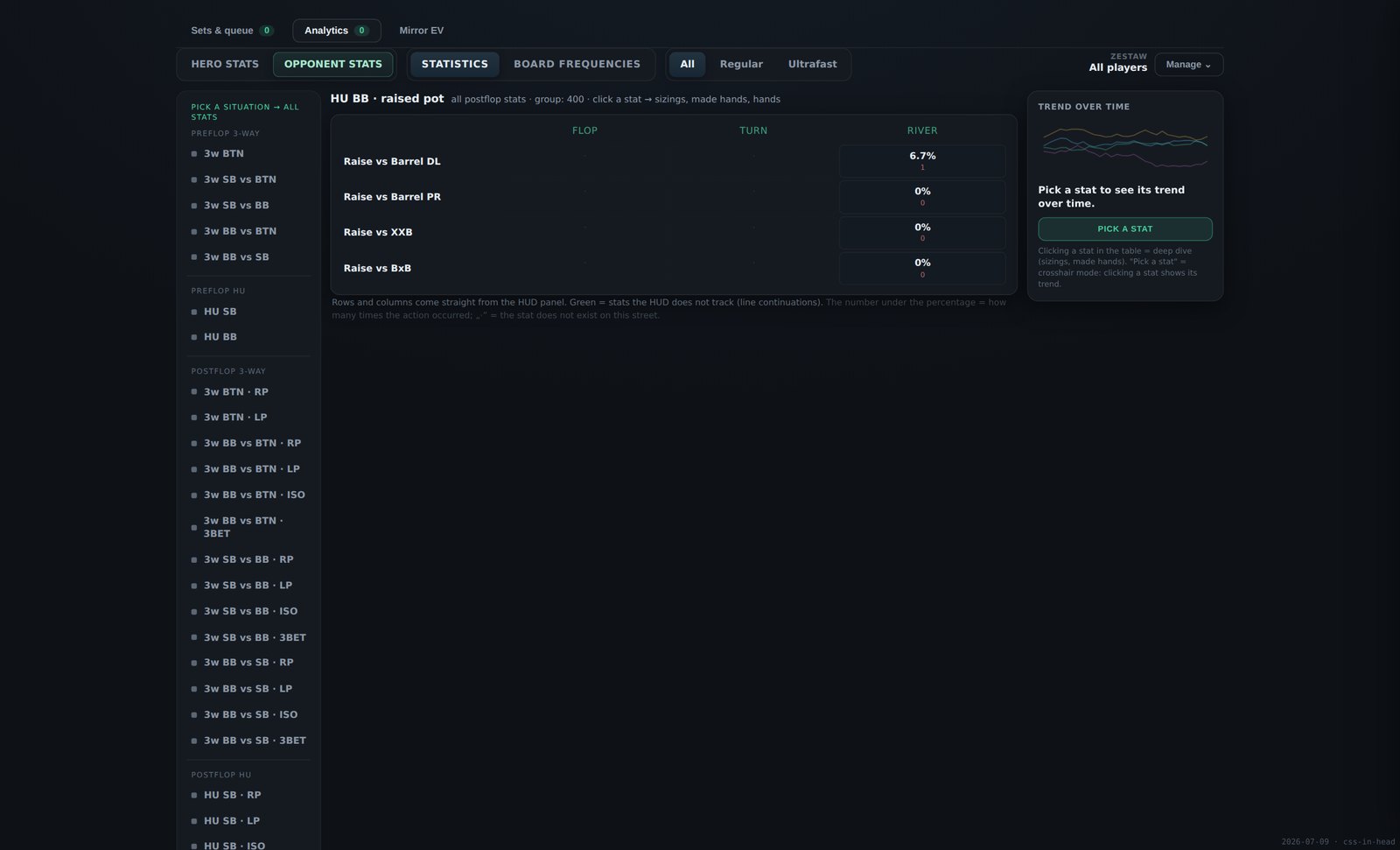
Opponent stats · HU SB in a raised pot. One toggle switches the whole screen between the two perspectives — the same rows, the same streets, now answering how the group played against you, with the sample under every figure.
Every decision you make has an alternative you did not take. Mirror EV puts them side by side and shows what each one actually returned, in big blinds per situation, out of your own hands.
It is not a table of statistics with a panel behind it — it is a different question. A c-bet screen tells you how often you c-bet. This tells you what c-betting earned you compared with checking, against the players you were actually facing.
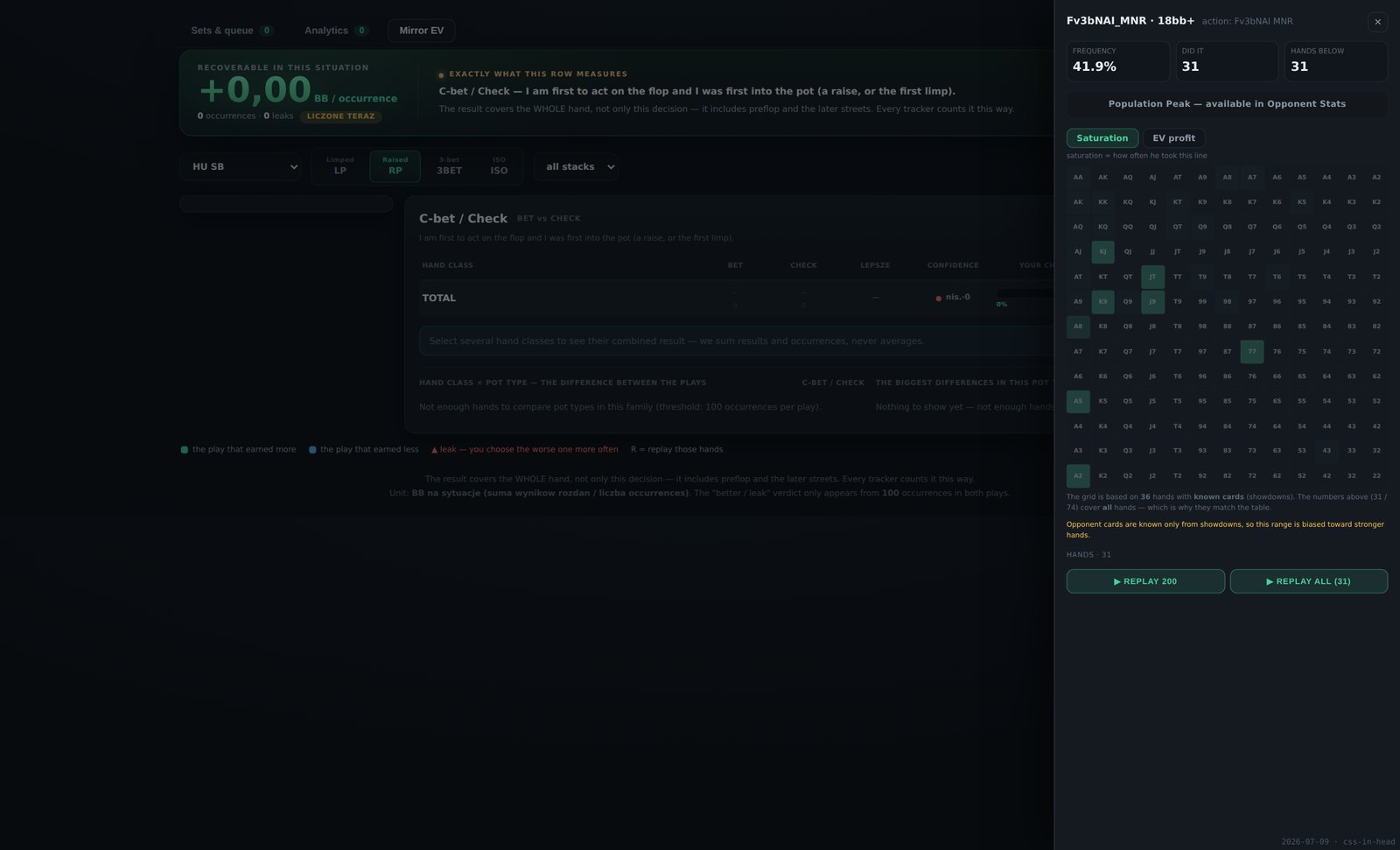
A decision family, its alternatives across the columns, your made-hand classes down the rows. Every cell is EV in big blinds per situation, with the number of situations behind it.
Where the decision is binary it reads as a pair — c-bet or check, donk or check, second barrel or check, third barrel or check. Where it is not, it reads as three: facing a c-bet you get fold, call and raise next to each other. Preflop has its own families — open, all-in, limp or fold; and versus a raise, 3-bet, call or fold.
Point it at a single opponent you have history on, or at any group you built — aggressive recreationals, the regulars, a named list. The rows then answer for exactly those opponents. Postflop counts only the hands that went heads-up to the flop, so the two sides are genuinely comparable.
Both, kept strictly apart. Postflop rows are made-hand classes on the street of the decision; preflop rows are starting-hand categories. Preflop folds are priced from the blind you gave up, not guessed.
Each row has a checkbox. Tick the classes you care about — say every draw and every air holding — and the bar at the top gives the combined EV of each decision across that whole selection, with the better one marked. The figures are summed properly from the underlying totals, not averaged from averages, so a selection of ten classes is as trustworthy as one.
Click any EV cell and the hands where you made that specific decision with that holding open in the replayer. Or use the replay button on the row to get the whole family at once. The hands you watch are precisely the hands behind the number you clicked.
| Situation | Eight seats and matchups: HU SB, HU BB, and in three-way BTN vs SB, BTN vs BB, SB vs BTN, BB vs BTN, SB vs BB, BB vs SB. Who stayed in the pot decides the label, not who was dealt in. |
| Pot type | Limped, raised, 3-bet and iso pots, as tabs. All four are fetched at once, so switching between them is instant. |
| Effective stack | Under 9bb, 9–13bb, 13bb+, or all stacks together. |
| Your holding | Thirteen made-hand classes postflop, twelve starting-hand categories preflop, plus a row for hands where the cards were never shown and a total row. |
| Boards | Inherited from the card filter of the set you are in — build the set on monotone flops, or paired boards, or one exact flop, and Mirror EV answers on those boards only. |
One grid of your holdings against the four pot types, shaded by the gap between your best and worst decision. It shows at a glance where in the game your decisions are costing you the most, before you read a single number.
For the pot type you are looking at, a short list of the spots where the gap between what you do and the better alternative is largest. It is the shortest route from "something is wrong" to "here it is".
Own performance
Three screens that answer questions a general-purpose tracker never asks: where in the seat map your money comes from, who it comes from, and whether the way you schedule your grind is costing you.
Your result broken down by the position you were in, in chip EV — the all-in adjusted figure, so a river cooler does not decide what the screen tells you.
Six buckets that match how a Spin is actually played: heads-up in position and out of position, and in three-way the button, the small blind against the big blind, and the big blind against each of them. Each shows chip EV per tournament with chip EV per hand underneath, and directly below that the same figure split against regulars and against recreational players, with the hand count behind each.
The heads-up numbers are divided by the tournaments where you actually reached heads-up, not by every tournament you entered — otherwise the figure would silently punish you for busting early.
Every player list you created appears as an extra row under each position, in the colour you gave it. So you can read your button EV against "aggressive recreationals" next to your button EV against "regulars I have 2,000 hands on", in the same grid.
Above the grid the same split runs across the whole sample: heads-up against a reg and against a fish, and three-way against two regs, one of each, and two recreational players.
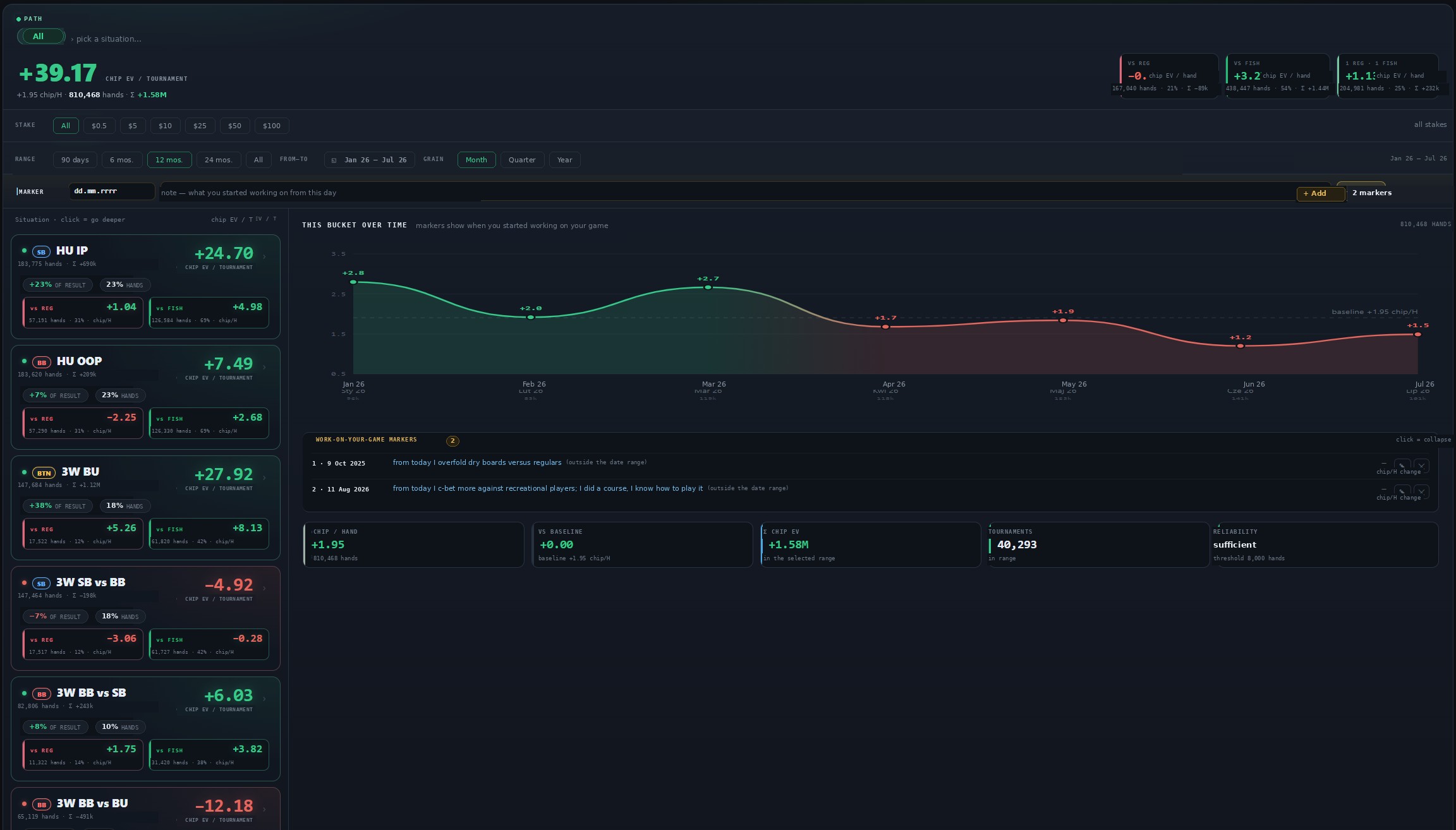
Detailed results — chip EV per position with the regular / recreational split under each bucket, the timeline of that bucket, and the markers that record when you changed something in your game.
The same idea turned round: not how you did, but how each opponent did against you.
When you play, how many tables you play, and how long you play for — measured against your own results rather than against advice. Everything on this screen is compared with one baseline: your own average chip EV per tournament over the same filtered games.
Seven days across twenty-four hours. The background of each cell is the lineup you met there — the proportion of tables with two regulars, one of each, and two recreational players. The number and its outline are your chip EV per tournament in that window: green above your baseline, red below it.
So one glance answers both halves of the question — where the games are soft, and where you actually earn. The legend closes it with a single sentence: what share of your games fall in windows below your own baseline.
Under the map runs a strip of games per hour. A bar turns red only when that hour is both below baseline and one of the hours you put the most volume into — that is, exactly where you play a lot and earn less.
Click any cell, row or column — or use the presets for evenings, nights and weekends — and a panel totals it up: chips per tournament if you played only there, the tournaments, the hands, the games per hour, the difference from your baseline, and what share of your volume it represents.
The headline figure is the share of your hands played at a table holding at least one regular — weighted by hands, not by seats, because a table you leave on the first hand should not count the same as one you play to the end.
Rolling three-hour windows summed across every day, ranked best and worst. With too little volume it refuses to rank and tells you how many games your biggest window actually has, instead of pretending.
Ten three-day windows across the month, so you can see whether the part of the month you are in changes your results — the curve is coloured above and below your baseline, with the game count under every point.
A scatter of your windows: reg share on one axis, chip EV per tournament on the other, with the slope reported as what every extra ten points of regulars costs you.
Every tournament is measured for its real pace and sorted into games-per-hour buckets — which is to say, into how many tables you were actually running. You choose the thresholds yourself, or take one of the presets, and each bucket shows your chip EV per tournament as a bar leaving a central baseline, left when it is below your average and right when it is above.
And then it removes the excuse. A faster bucket can look better simply because the tables happened to be softer, so beside the raw figure the screen prints a standardised one: your result recomputed as if every bucket had met the same lineup mix as your history overall, using your own chips-per-hand against regulars and against recreational players. When a bucket's own reg share already equals the reference, the two numbers are identical to the chip — by construction. The difference between them is therefore exactly the part of your result that came from the tables you drew rather than from the number of them.
Buckets under 300 tournaments are dimmed and labelled as noise rather than quietly averaged in.
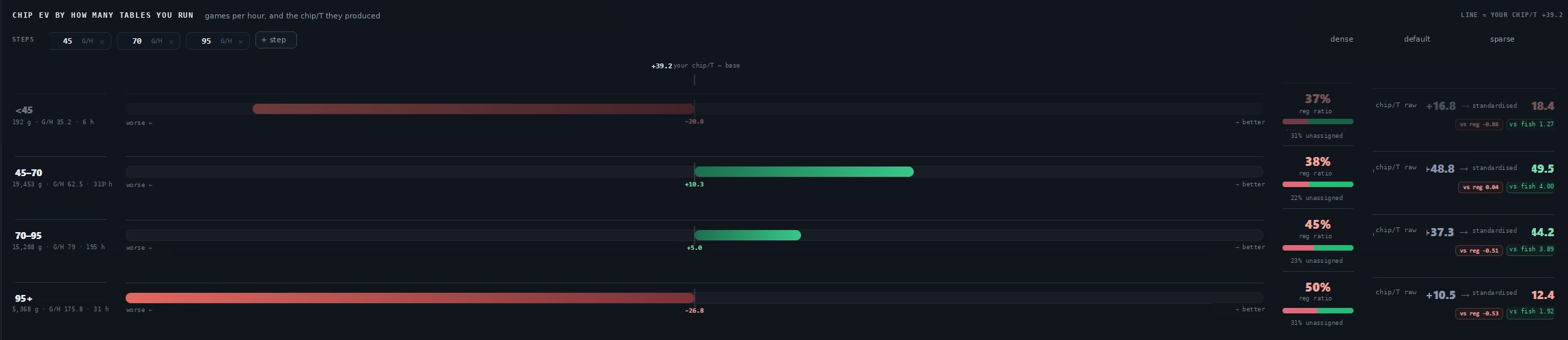
Each bucket carries its games, its games per hour and its hours; the bar leaves the central line at your own average. On the right, the lineup you met in that bucket, then the raw chip EV per tournament and the standardised one beside it — the gap between the two is the part that came from the tables you drew rather than from the number of them.
The same measurement — your chip EV per tournament against elapsed time — cut three ways by what counts as a break. Multitabling does not split a session; the axis follows the union of hands across all your tables.
Each chart marks its low point and draws a line at the first bucket that falls below your baseline. Points built on fewer than 30 games are dimmed, and the series stops rather than trailing off into a sample that cannot carry it.
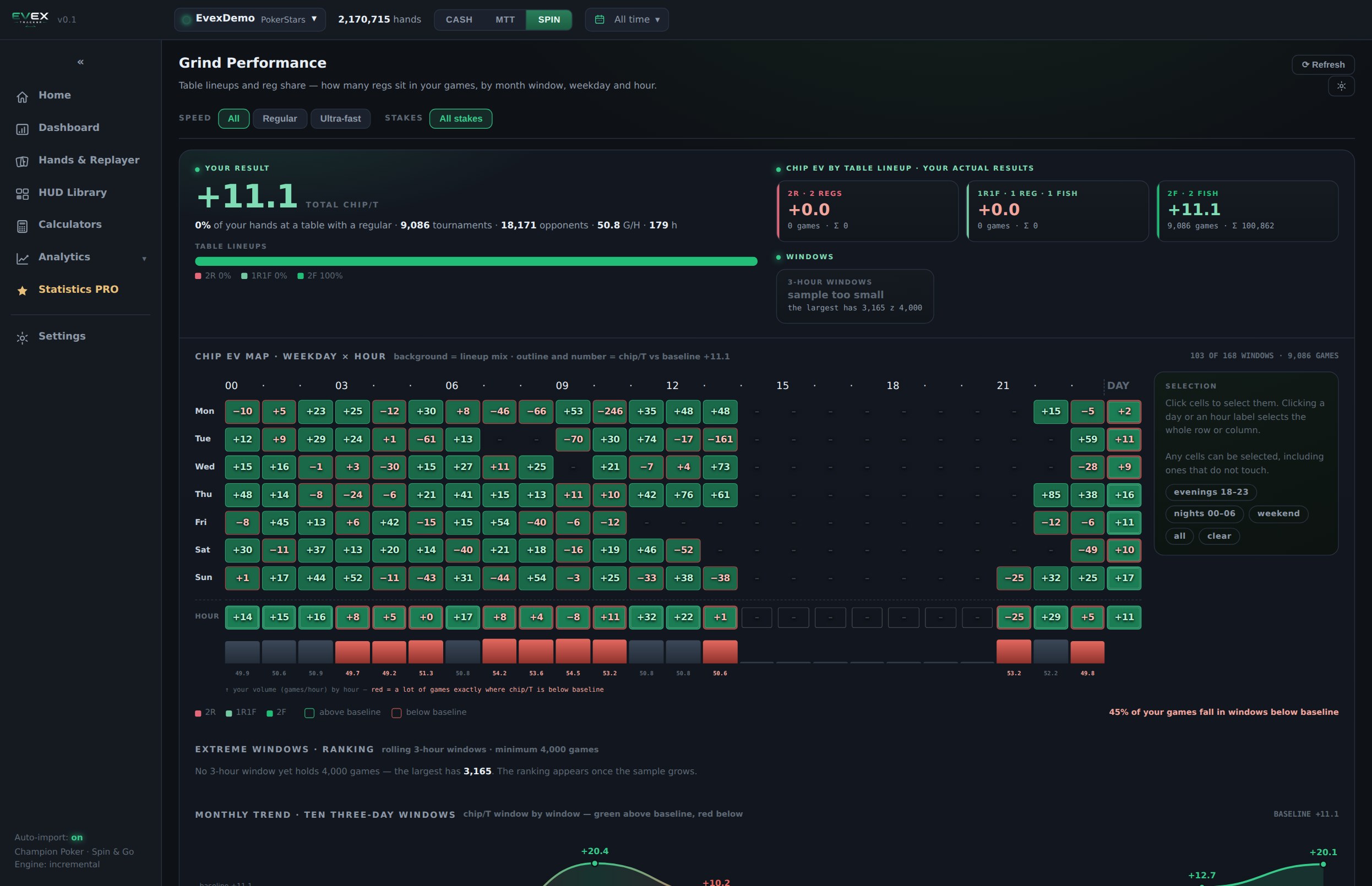
Grind performance. The map reads two things at once — the background of every cell is the lineup you met in that window, the number and its outline are your chip EV per tournament against your own baseline. Under it, the volume strip: red bars are the hours where you play a lot and earn less. Everything on the screen is clickable into a totals panel.
Lists, calculators, settings
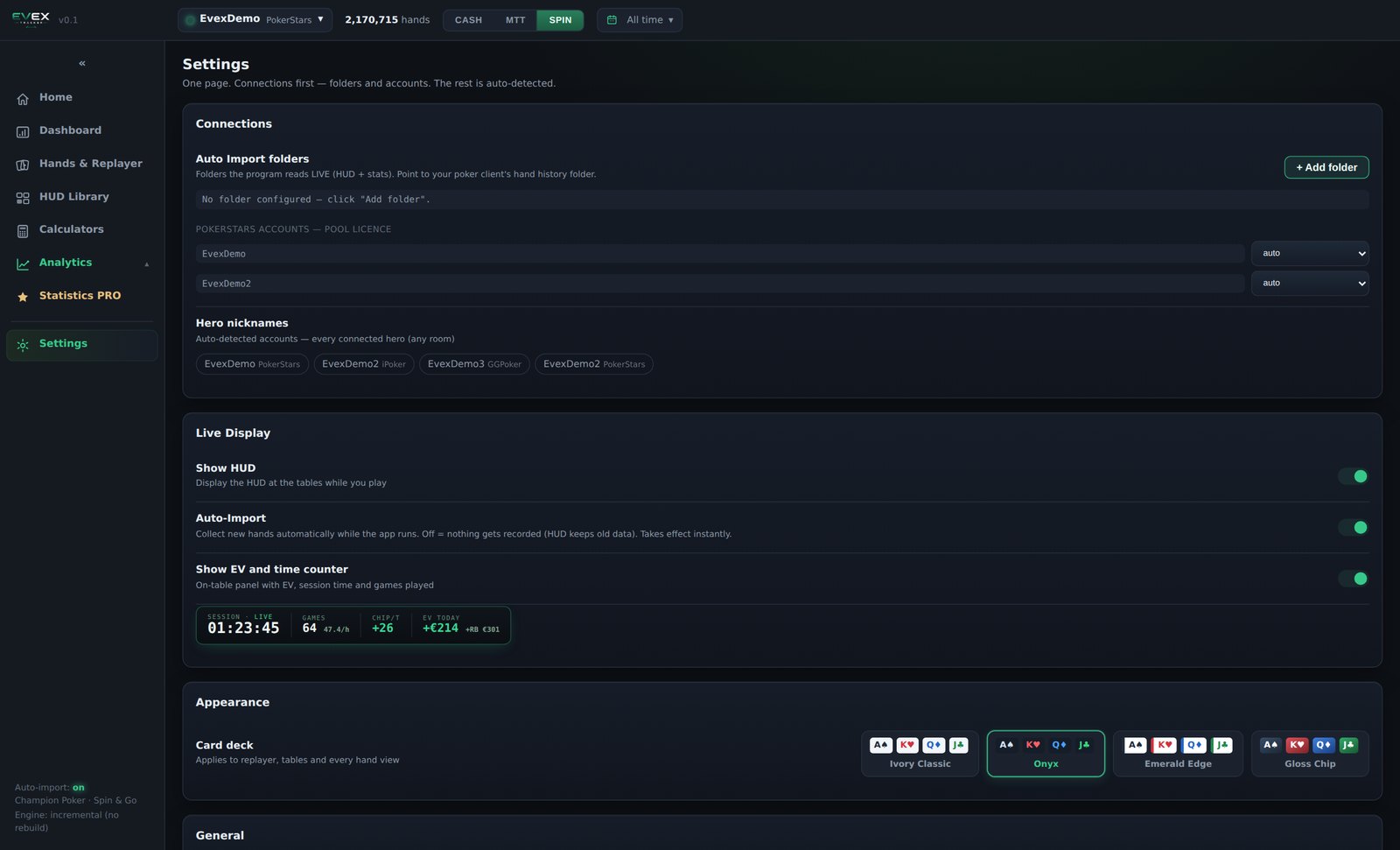
Player Lists
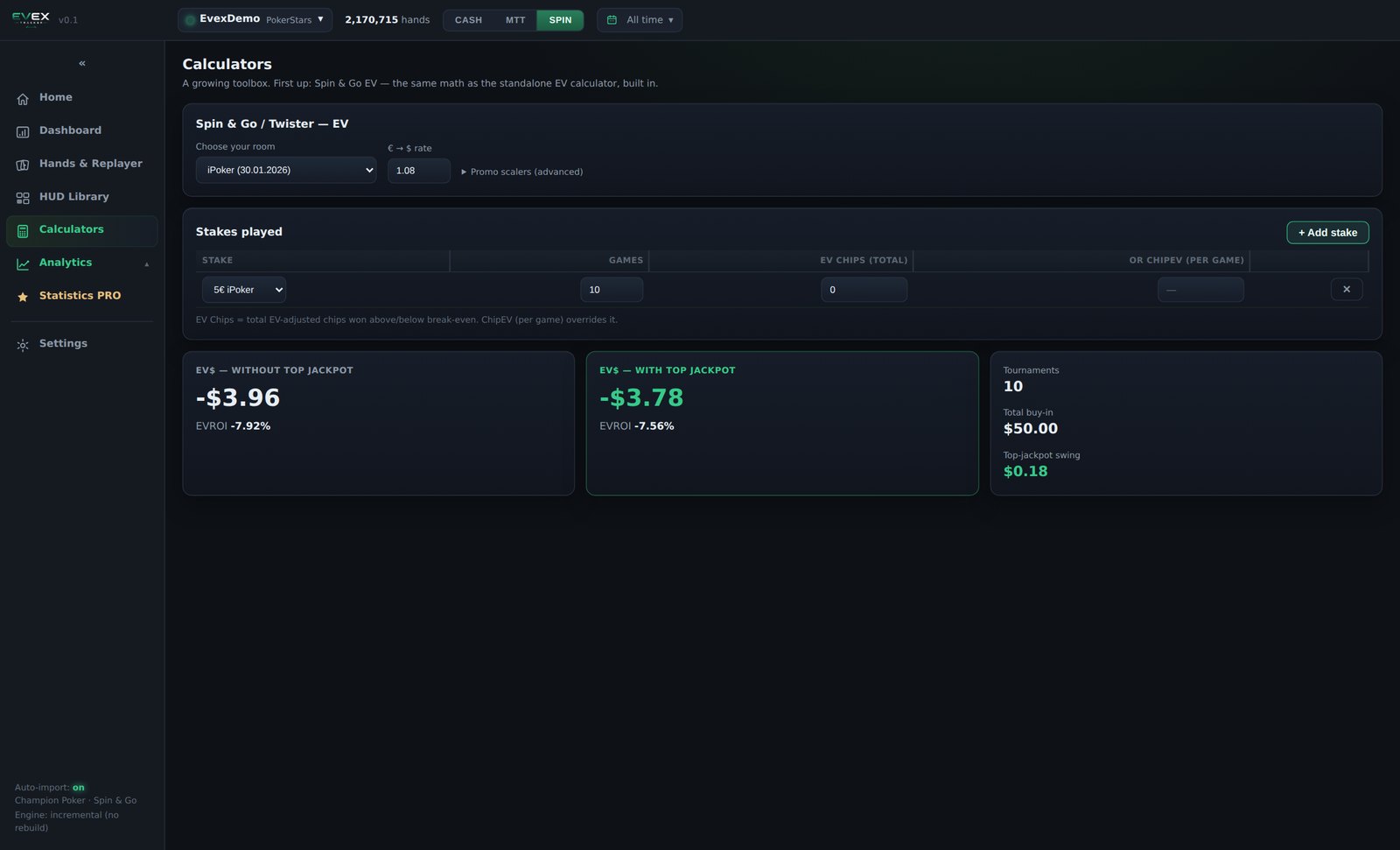
Calculators
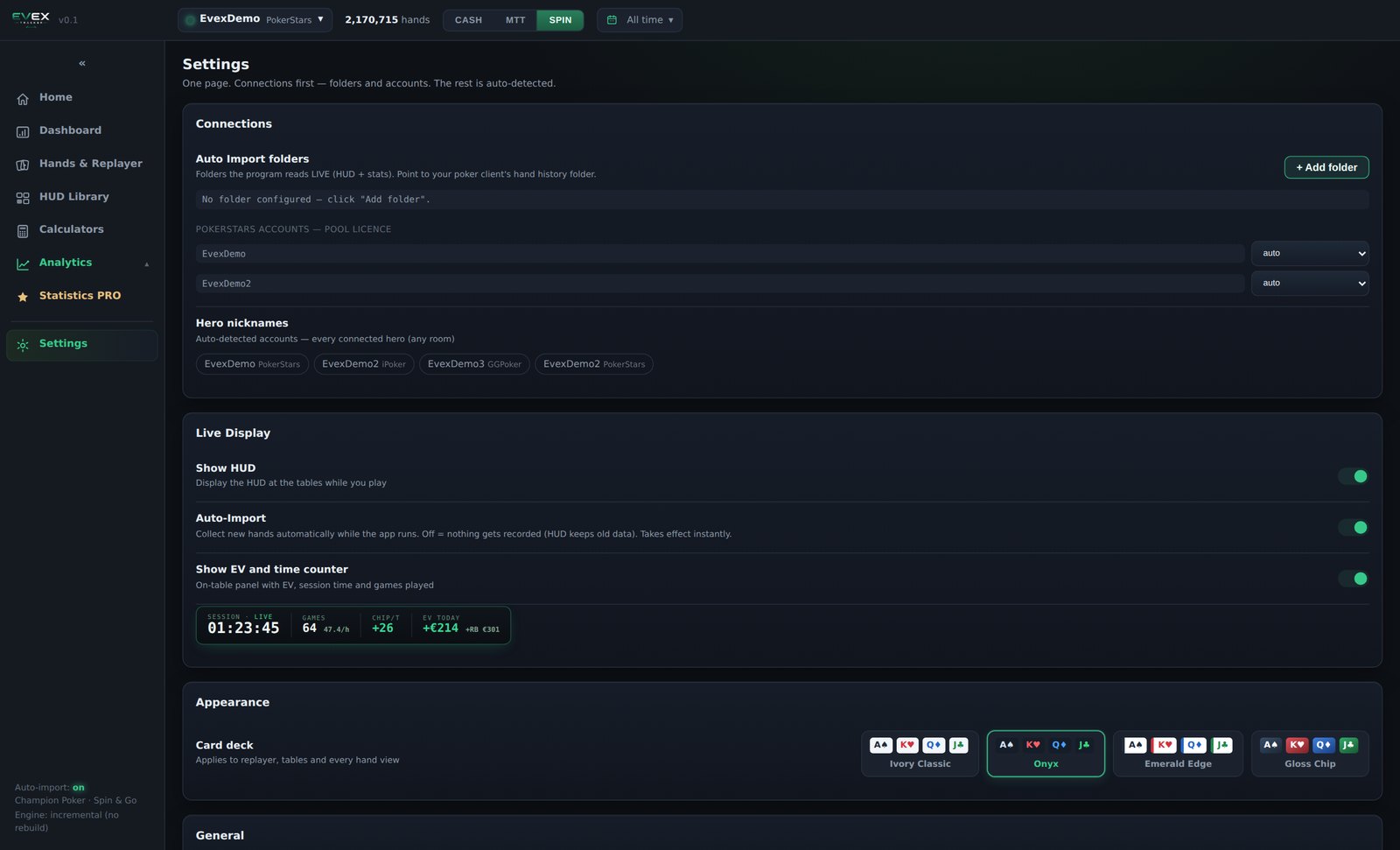
Settings
Full feature list
A complete index of what is in the product, screen by screen — for anyone who wants the whole list in one place rather than reading the pages above. Nothing new here; it is the same product, written as a reference.
| Auto-import | Watched folders; new hands added during the session while you play. |
| Multiple databases | Create, rename, switch, delete; a database can be limited to one room. |
| Multi-account | Several of your own accounts in one database, detected from the files. Your own accounts can be grouped under one alias (nickname + room pairs). Opponent nicknames are never merged automatically. |
| Export | Your own hand histories in their original text format, at any time, importable anywhere else. |
| Summary figures | Game count, chips per tournament (EV-adjusted and realised), net won, ROI, won at showdown, won without showdown, ITM, average buy-in, hours, games per hour, rakeback. |
| Winnings graph | Chips: net won, all-in adjusted, won at showdown, won without showdown. Money: net won and net plus rakeback. Cumulative by tournament, drag to zoom, lines switchable. |
| Breakdowns | Stake, month, day of week, hour, session, hand. |
| Detailed results | Chip EV across six hero situations, each split by lineup (regulars, recreational, custom lists), with heads-up and three-way summary blocks and a "reached heads-up" figure. |
| Opponents results | Chip EV of every heads-up opponent you have played, total and split by their position; filter by all / reg / fish or by list; minimum hand threshold; graph per opponent or per group. |
| Grind performance | Reg share and results by three-day window, weekday and hour, a weekday × hour heat map, pace buckets in steps of five games per hour with results re-priced to your usual lineup mix, session charts at three time scales. |
| Mirror EV | The alternative plays you made in the same situation, compared by realised result in BB per occurrence, across eight situations × four pot types × three stack bands × thirteen made-hand classes. A verdict needs 100 occurrences per alternative and a 0.05 BB gap. |
| Table layouts | SpinPRO 3-way, Simple 3-way, HU, Deep HU, Simple HU; Compact 3-max, Compact HU; SpinIntuition 3-way, HU; MTT; Advanced Cash, Cash HUD, Simple Cash — with new ones added regularly. |
| Widget layouts | Waffle, traffic lights, sliders, bento, nixie, ticker, segment battery, glass cards, thermometry, glossy donuts, radar, rose, speedometer, reticle, activity rings, bubbles, isometric, plus street widgets, table skins and orbitals — the list keeps growing. |
| Skins | Full Focus, Neon, Classic, Colour BG, Round; stored per HUD. Four of them change panel structure, not only styling. |
| Statistics | A large statistics engine behind the bundled HUDs: preflop by table type, seat and stack bucket; postflop by street, pot type and line. |
| Pop-up library | Attached per HUD slot; breakdown by bet sizing and by board texture, recent hands from that player, replayer; single panel or tabs; pinnable. Breakdowns by hole cards or made hand are blocked in the editor, at render time and on the server. |
| Resizable | HUDs and pop-ups are resized at the table by dragging a corner; the font scales with the panel. Positions are stored per HUD, per format and per table size, and survive updates. |
| Refresh speed | The overlay is rebuilt in under a second after a hand ends, and does not slow down as tables are added. |
| Automatic table size | When the third player busts, the HUD switches from the three-way layout to the heads-up layout on its own. |
| Pop-up pairing | Any pop-up in the library can be attached to any HUD slot, and travels with that layout. |
| Colour coding | Three colours against fixed thresholds — green for too much aggression, red for passivity, white for the optimum — with a minimum-sample gate below which a cell shows a dash instead of a number. |
| Session counter | On-table panel with session time, games played and result. |
| Subjects | Yourself, one opponent, or a player group; opponent figures from hands you played against them. |
| Preflop views | Seven: 3-way BTN, SB vs BTN, SB vs BB, BB vs BTN, BB vs SB, HU SB, HU BB. Blind-vs-blind hands kept in a separate table. |
| Postflop views | Twenty-two: each matchup crossed with raised, limped, iso and 3-bet pots. Rows follow your role in the pot (aggressor or defender); columns are flop, turn and river. |
| Preflop detail | Raise group: VPIP, RFI, min-raise, raise, open-shove, fold to 3-bet by open size and by all-in. Versus raise: fold and call versus min-raise, raise and open-shove, 3-bet overall / all-in / non-all-in, squeeze. Limp: limp, limp-raise, limp-fold versus non-all-in and all-in iso. Versus limp: iso, iso all-in, fold to limp-3bet. |
| Sizing detail | The size used and the size faced, in buckets, inside the stat breakdown panel. |
| Stack detail | Analysis rows: under 6bb, 2bb steps to 30bb, 30bb+, with roll-ups. HUD ladders: heads-up 0–7 / 7–13 / 13–16 / 16bb+, three-way 0–10 / 10–16 / 16bb+ and 0–10 / 10–20 / 20bb+, deep heads-up in 10bb steps to 75bb+. |
| Preflop grid | 13×13 of what the subject did with each holding, with counts, opportunities and the realised EV of every holding actually played. |
| Stat breakdown panel | Preflop: frequency, occurrences, 13×13 holding grid in saturation or realised-result mode, drag selection, showdown-bias note, replay. Postflop: size used, value / bluff split, size faced, range composition by made hand with realised result per class, next actions, hand list. |
| Board frequencies | Thirteen board classes covering every distinct flop, by stack band (under 9bb, 9–13, 13bb+, combined), with turn and river run-out classes. |
| Trend and distribution | Any statistic over time, and across the players in your database. |
| Action drill-down | Action sequences that occurred in your database, street by street. |
| Player groups | Criteria on lists, dates, hand count, VPIP, aggression frequency, donk and any HUD statistic, each with its own minimum sample; reg and fish presets; manual exclusions; estimate of players, hands, time and disk before computing; compute now or queue. |
| Player segments | Regular, recreational and aggressive on thresholds you set, plus your own segments. |
| Sample size | Displayed beside every figure, with a warning when it is too small. |
| Modes | Individual hands or whole tournaments. |
| Board and hand filter | Ten three-state texture chips, rank type and composition, exact flop, turn and river cards, made-hand class, 13×13 grid. |
| Action sequence | Fold, check, call, bet, raise, all-in, per street. |
| General options | Speed, table size, position, effective stack, situation, stake, date range, colour marks, opponent hand count. |
| Presets | Save, name and recall filter combinations. |
| Replayer | One hand, a whole tournament, or every hand in the current filter; also from any statistic. |
| Marks and notes | Notes on hands and opponents; colour marks usable as a filter. |
| Export | Selected hand histories. |
| Auto classification | One pass over your pool: everyone above your hand-count bar, optionally combined with a VPIP bar, is tagged a regular; everyone else recreational. |
| Bulk segmenting | Several named lists in one scan, each with statistics, thresholds, minimum sample and colour. |
| Manual lists | Create, name, fill, empty, search by name. |
| Spin & Go EV calculator | Room prize structure, currency rate, promotional multipliers, several stakes with games played and all-in adjusted chips. Output: expected return and EV ROI with and without the top jackpot, total buy-in and the jackpot swing. No cards, stacks or tournament state. |
| Platform | Windows 10 / 11. Interface in English. |
| Storage | One local database file. |
| Network | Licence and account verification only. No hand history, statistic or database content is ever transmitted. |
| Licence | One subscription per user; the whole HUD library and every screen included. |
| Formats | Deep analysis for three-handed hyper-turbo; core cash and MTT support. |
| Rooms | The parser handles the major hand-history formats. A room is enabled in a release once that room has authorised the software. |
Statistics
A selection of what the engine computes and the HUDs can display.
VPIP · PFR · RFI by position · limp · overlimp · limp-raise · limp-call · limp-fold · iso · iso all-in · open-shove · min-raise and raise buckets · 3-bet overall / all-in / non-all-in · 4-bet · 5-bet · fold to 3-bet by open size and by all-in · fold to 4-bet · fold to min-raise · fold to open-shove · call open · call shove · cold-call · squeeze · steal · fold to steal · check behind in the big blind
C-bet · c-bet in iso and 3-bet pots · fold to c-bet per pot type · overbet · second and third barrel · fold to barrel · delayed c-bet and fold to it · probe · fold to probe · float · fold to float · donk · fold to donk · check-raise · fold to check-raise · bet-check-bet · check-check-bet · check-check-fold · raise · fold to raise · aggression frequency overall, IP and OOP
Won when saw flop · went to showdown · won money at showdown · won at showdown by bet and by call · all-in adjusted result per tournament · net result by position, stake and lineup
Position · table size · pot type (raised, limped, iso, 3-bet) · street · effective stack in 2bb buckets to 45bb+ · size used and size faced · board texture · made hand · opponent group · date range · speed · stake
Pricing
Every plan is a subscription with updates included, and every plan can be cancelled in one click. Prices in USD, excluding VAT — the rate for your country is shown before you pay.
Tracking, HUD and review. Everything you need at the table.
Adds the analysis engine — the reason most people buy a tracker.
For volume. Adds decision comparison and the performance suite.
| Feature | Core | Pro | Elite |
|---|---|---|---|
| Auto-import, unlimited local database | ✓ | ✓ | ✓ |
| HUD Library — every layout, skin variant and pop-up | ✓ | ✓ | ✓ |
| Cash game and MTT HUDs | ✓ | ✓ | ✓ |
| Results, sessions, graphs | ✓ | ✓ | ✓ |
| Hands, filters, replayer, four-table replay | ✓ | ✓ | ✓ |
| Player lists, notes, colour marks | ✓ | ✓ | ✓ |
| Spin & Go EV calculator | ✓ | ✓ | ✓ |
| Statistics PRO — full preflop and postflop analysis | — | ✓ | ✓ |
| Stat breakdown panels and 13×13 grids | — | ✓ | ✓ |
| Board frequencies | — | ✓ | ✓ |
| Player groups and computed sets | — | ✓ | ✓ |
| Opponent stats, trend, distribution | — | ✓ | ✓ |
| Mirror EV decision comparison | — | — | ✓ |
| Detailed results, opponents results, grind performance | — | — | ✓ |
| Build and export your own HUD layouts | — | — | ✓ |
| Computers per licence | 1 | 2 | 3 |
| Support | 2 business days | 2 business days | 24 hours |
| Updates while subscribed | ✓ | ✓ | ✓ |
Any time, in both directions. Moving up is charged pro rata for the rest of the period; moving down takes effect at the next renewal.
You keep access until the end of the period you paid for, then the licence stops. Your database and your original hand histories stay on your computer, untouched.
Only at start-up, for a licence check that takes a second. The import, the HUD and every analysis screen run offline on your own machine.
To the number of computers in your plan. You can move a seat to a new machine yourself from the settings screen.
Card, Apple Pay or Google Pay through Stripe. An invoice with your details, and your tax ID if you give one, is e-mailed for every payment.
Contact
Questions about the product, the formats it covers or the rooms it reads.
bartoszownkowalski@gmail.com
 Evex Tracker